Persistent Volumes: The Orchestration of Data Gravity
In Kubernetes, storage is a first-class resource. The system decouples the provisioning of storage (managed by an Admin/CSI) from the consumption of storage (managed by a Developer).
1. THE ARCHITECTURAL ABSTRACTION
The storage stack is divided into three layers to ensure portability across different cloud and on-prem environments.
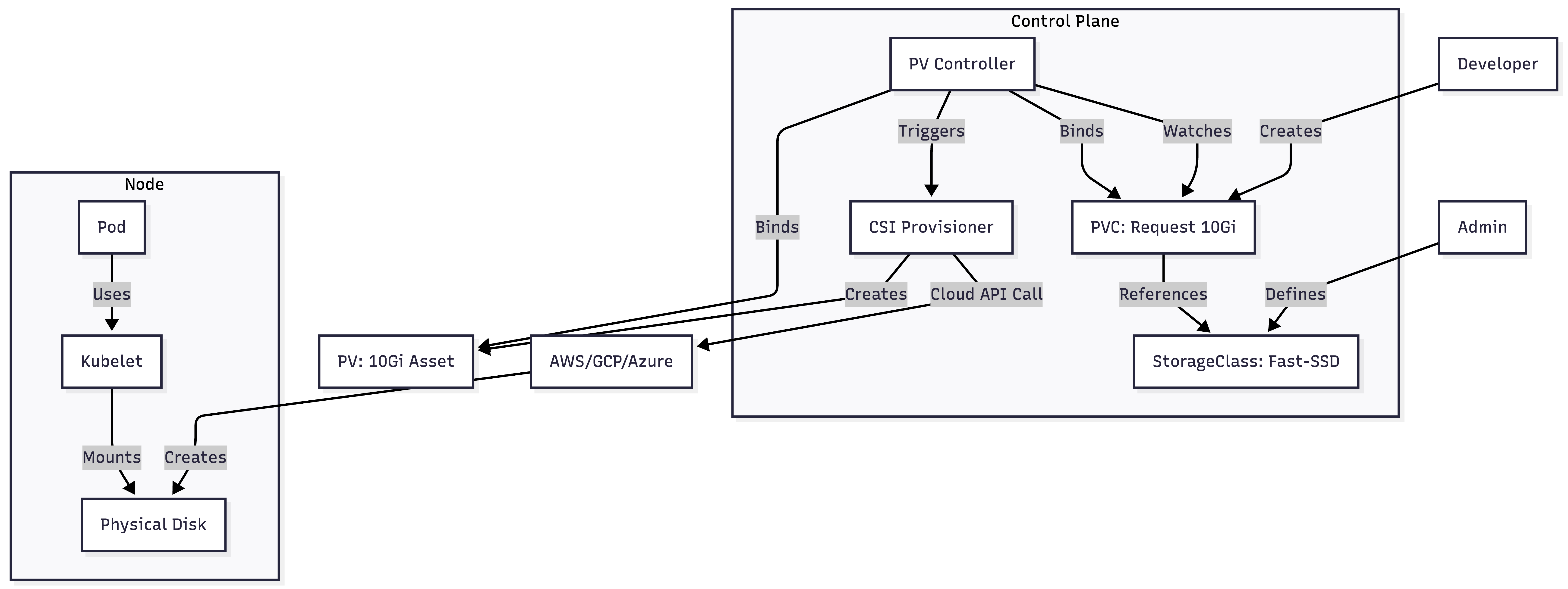
- StorageClass (The Policy): Defines "How" storage is created (e.g., "Fast SSD," "Encrypted," "Retain on Delete").
- PersistentVolume (The Asset): A cluster-scoped object representing a physical disk.
- PersistentVolumeClaim (The Request): A namespace-scoped ticket used by developers to "buy" a PV.
1.1 The Control Loop (Reconciliation)
The PV Controller in the kube-controller-manager runs a continuous loop. It watches for new PVCs and tries to find a matching PV. If found, it "binds" them by setting the spec.claimRef on the PV and status.phase: Bound on the PVC.
2. PERSISTENT VOLUMES (PV)
A PV is Cluster-Scoped. It exists outside of any namespace, much like a Node.
2.1 Access Modes Internals
- ReadWriteOnce (RWO): Mounted by a single node. This is enforced by the block layer (e.g., AWS EBS cannot be attached to two VMs simultaneously).
- ReadWriteMany (RWX): Mounted by many nodes. Requires a network filesystem (NFS, CephFS, EFS) that handles file-level locking.
- ReadWriteOncePod (RWOP): (v1.27+) Ensures that only one Pod in the entire cluster can write to the volume. This is the strictest lock available.
2.2 Reclaim Policies
What happens to the physical disk when the PVC is deleted?
- Delete (Default): The PV and the actual physical asset (EBS/GCE Disk) are deleted.
- Retain: The PV status becomes
Released. The physical data is preserved. An admin must manually delete the PV and the cloud disk.
3. PERSISTENT VOLUME CLAIMS (PVC)
A PVC is Namespace-Scoped. Pods can only use PVCs within their own namespace.
3.1 The Binding Logic
The PV Controller matches PVCs to PVs based on:
- StorageClassName: Must be identical.
- AccessModes: PV must support at least what the PVC requests.
- Size: PV must be $\ge$ PVC request. (If you request 5Gi and only a 100Gi PV is available, Kubernetes will bind it, effectively "wasting" 95Gi).
4. STORAGE CLASSES & DYNAMIC PROVISIONING
Dynamic provisioning allows storage to be created "on-demand," eliminating the need for admins to manually pre-create hundreds of PVs.
4.1 Volume Binding Mode: The Zonal Trap
This is the most critical setting for Multi-AZ clusters (AWS/GCP/Azure).
- Immediate (Default): As soon as a PVC is created, the PV is provisioned.
- Problem: The disk is created in AZ-1, but the Pod's CPU/Mem requirements might force it to schedule in AZ-2. The Pod will stay
Pendingwith aVolume Node Affinityerror.
- Problem: The disk is created in AZ-1, but the Pod's CPU/Mem requirements might force it to schedule in AZ-2. The Pod will stay
- WaitForFirstConsumer: The PVC stays
Pendinguntil a Pod is created. The Scheduler then looks at the Pod's requirements and the available Node zones, then tells the CSI driver: "Create the disk in AZ-2."
4.2 Production StorageClass Manifest
apiVersion: storage.k8s.io/v1
kind: StorageClass
metadata:
  name: production-ssd-waited
provisioner: ebs.csi.aws.com
reclaimPolicy: Retain                # Safety first in production
volumeBindingMode: WaitForFirstConsumer # Essential for Multi-AZ
allowVolumeExpansion: true           # Enable online resizing
parameters:
  type: gp3
  encrypted: "true"
5. VOLUME EXPANSION (RESIZING)
Kubernetes supports increasing the size of a volume without recreating the PVC.
5.1 The Two-Step Expansion
- Cloud Expansion: The CSI driver calls the Cloud API to expand the block device.
- File System Expansion: The
Kubeleton the node detects the new size and runsresize2fsorxfs_growfsto expand the partition.- Note: Most modern drivers support Online Expansion (the Pod stays running).
6. BIBLE-GRADE YAML: THE FULL STACK
6.1 The Request (PVC)
apiVersion: v1
kind: PersistentVolumeClaim
metadata:
  name: data-pvc
  namespace: prod-apps
spec:
  accessModes:
    - ReadWriteOnce
  resources:
    requests:
      storage: 50Gi
  storageClassName: production-ssd-waited
6.2 The Workload (Pod)
apiVersion: v1
kind: Pod
metadata:
  name: database-pod
spec:
  containers:
  - name: db
    image: postgres:15
    volumeMounts:
    - name: pg-data
      mountPath: /var/lib/postgresql/data
  volumes:
  - name: pg-data
    persistentVolumeClaim:
      claimName: data-pvc # Maps the Pod to the Claim
7. VISUALS: THE BINDING WORKFLOW
8. TROUBLESHOOTING & ARCHITECT COMMANDS
8.1 "PVC Stuck in Pending"
If a PVC is pending, investigate the StorageClass and Events.
# Check if the provisioner is failing
kubectl describe pvc <pvc-name>
# Common Error: "failed to provision volume with StorageClass: permission denied"
8.2 Inspecting the Binding
Check the claimRef to see exactly which PVC owns a PV.
kubectl get pv <pv-name> -o jsonpath='{.spec.claimRef.name}'
8.3 Force Resizing Verification
After editing the PVC size, check the status:
kubectl get pvc <pvc-name> -o jsonpath='{.status.capacity.storage}'
# If it hasn't changed, check the Pod logs for 'FileSystemResizePending'
8.4 The "Terminating" PVC Hang
A PVC will stay in Terminating status if a Pod is still using it. This is a safety feature called Storage Object Protection.
# Check for the finalizer
kubectl get pvc <pvc-name> -o yaml
# Look for: finalizers: [kubernetes.io/pvc-protection]