Persistent Storage & CSI Architecture
In Kubernetes, storage is decoupled from compute. The PersistentVolume (PV) subsystem provides an API for users and administrators that abstracts details of how storage is provided from how it is consumed.
1. THE EVOLUTION: IN-TREE TO CSI
The migration from "In-Tree" to CSI is one of the most significant architectural shifts in Kubernetes history.
1.1 In-Tree Drivers (Legacy)
Historically, storage drivers (AWS EBS, GCE PD, NFS) were part of the Kubernetes source code.
- The Problem: To fix a bug in the AWS EBS driver, you had to wait for a full Kubernetes release. If a driver crashed, it could take down the
kube-controller-manager. - The Solution: The Container Storage Interface (CSI).
1.2 CSI: The Modern Standard
CSI is a gRPC-based specification that allows storage vendors to develop a single driver that works across multiple orchestrators (Kubernetes, Mesos, Nomad).
- Decoupling: Drivers are now "Out-of-Tree." Vendors ship them as standard container images.
- Privileged Execution: CSI drivers run as DaemonSets on nodes (to perform mounts) and Deployments (to talk to Cloud APIs).
2. CSI INTERNALS: THE SIDECAR PATTERN
A CSI driver is rarely a single container. It is a collection of helper sidecars (provided by the Kubernetes team) and the vendor-specific driver.
2.1 The Control Plane Sidecars
These typically run in a highly available Deployment (e.g., ebs-csi-controller).
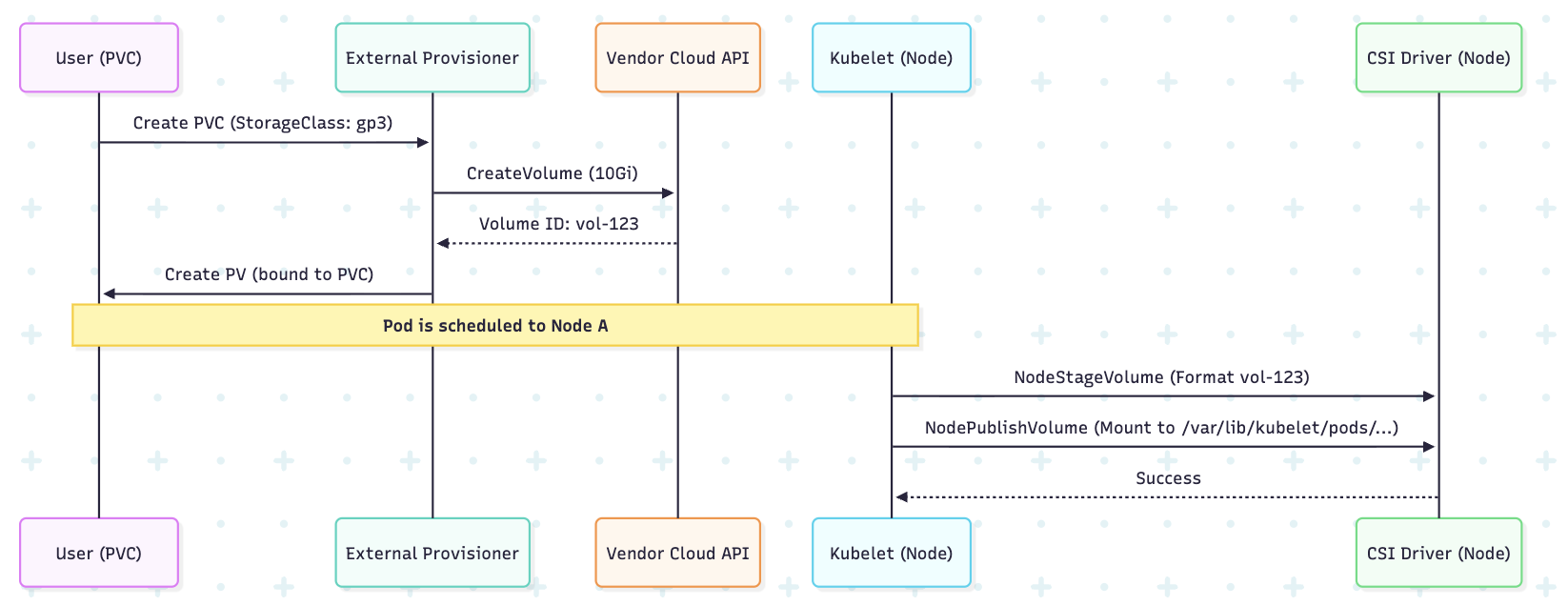
- external-provisioner: Watches for
PersistentVolumeClaim(PVC) objects. When a PVC is created, it calls the CSI driver’sCreateVolumegRPC endpoint, which in turn calls the Cloud API (e.g., AWS CreateVolume). - external-attacher: Watches for
VolumeAttachmentobjects. It handles the "Attachment" phase—telling the cloud provider to attach the virtual disk to a specific virtual machine (Node). - external-resizer: Watches for PVC size changes and triggers the cloud-side volume expansion.
- external-snapshotter: Handles the creation of VolumeSnapshots.
2.2 The Node Sidecars
These run as a DaemonSet on every worker node (e.g., ebs-csi-node).
- node-driver-registrar: Registers the vendor CSI driver with the Kubelet using the Kubelet's plugin registration mechanism.
- CSI Driver: The actual vendor code that performs the
NodeStageVolume(formatting the disk) andNodePublishVolume(mounting the disk into the Pod's path).
2.3 CSI Workflow Diagram
3. VOLUME MODES: FILESYSTEM VS. BLOCK
Kubernetes allows you to consume storage in two ways.
3.1 Filesystem (Default)
The Kubelet ensures the volume is formatted with a filesystem (ext4, xfs) before mounting it into the Pod as a directory.
- Logic:
Device -> Format -> Mount -> Container Path.
3.2 Block (Raw)
The volume is presented to the Pod as a raw block device (e.g., /dev/xvdb).
- Use Case: High-performance databases (Oracle, MongoDB) or software-defined storage (Ceph) that prefer to manage their own disk I/O without filesystem overhead.
- Manifest Detail:
spec:
  volumeMode: Block # Defaults to Filesystem
4. STORAGE ACCESS MODES
| Mode | Description | Support Example |
|---|---|---|
| ReadWriteOnce (RWO) | Mounted by a single node as read-write. | AWS EBS, Azure Disk. |
| ReadOnlyMany (ROX) | Mounted by many nodes as read-only. | NetApp, NFS. |
| ReadWriteMany (RWX) | Mounted by many nodes as read-write. | EFS, Azure Files, CephFS. |
| ReadWriteOncePod (RWOP) | Mounted by a single pod as read-write. | Available in v1.27+. Prevents multi-pod access on the same node. |
5. PRODUCTION-READY MANIFESTS
5.1 StorageClass (The Blueprint)
A StorageClass defines how volumes are provisioned.
apiVersion: storage.k8s.io/v1
kind: StorageClass
metadata:
  name: production-ssd
provisioner: ebs.csi.aws.com # The CSI Driver
reclaimPolicy: Retain        # Critical: Retain data if PVC is accidentally deleted
volumeBindingMode: WaitForFirstConsumer # Important: Prevents AZ mismatch errors
allowVolumeExpansion: true
parameters:
  type: gp3
  iops: "3000"
  encrypted: "true"
5.2 PersistentVolumeClaim (The Request)
The developer requests storage via the PVC.
apiVersion: v1
kind: PersistentVolumeClaim
metadata:
  name: database-storage
spec:
  accessModes:
    - ReadWriteOnce
  storageClassName: production-ssd
  resources:
    requests:
      storage: 50Gi
6. LOCAL PERSISTENT STORAGE: HOSTPATH VS. LOCAL
Senior engineers must distinguish between hostPath and Local Persistent Volumes.
6.1 hostPath (Anti-Pattern for Persistence)
- Logic: Mounts a directory from the node's host filesystem directly.
- Risk: If the Pod is rescheduled to another node, the data is gone. It is not managed by the PV/PVC system.
- Usage: Only for system-level DaemonSets (e.g., log collectors needing
/var/log).
6.2 Local Persistent Volumes (Production Grade)
- Logic: A specific disk (NVMe/SSD) attached to a node is registered as a PV.
- Advantage: Used for high-performance databases (Cassandra, ElasticSearch).
- Constraint: Requires Node Affinity. Kubernetes knows the data is on
Node-Aand will only schedule the Pod there.
apiVersion: v1
kind: PersistentVolume
metadata:
  name: local-nvme-pv
spec:
  capacity:
    storage: 500Gi
  accessModes:
  - ReadWriteOnce
  persistentVolumeReclaimPolicy: Delete
  storageClassName: local-storage
  local:
    path: /mnt/disks/nvme0
  nodeAffinity: # CRITICAL: Tells the scheduler where this disk physically is
    required:
      nodeSelectorTerms:
      - matchExpressions:
        - key: kubernetes.io/hostname
          operator: In
          values:
          - worker-node-01
7. TROUBLESHOOTING & ARCHITECT COMMANDS
Identify Storage Driver Issues
If a PVC is stuck in Pending:
# 1. Check the PVC events
kubectl describe pvc <pvc-name>

# 2. Check the CSI Driver pods for errors
kubectl logs -n kube-system deploy/ebs-csi-controller -c csi-provisioner

# 3. Verify the CSI Driver is registered
kubectl get csidrivers
Checking Mounts on the Node
If a volume is attached but the app can't write:
- SSH into the node.
- Run
findmnt | grep <pvc-uuid>to see where the Kubelet mounted the disk. - Check
lsblkto verify the raw device attachment.