Network Policies: Implementing Zero-Trust Security
By default, Kubernetes networking is a "Flat Network." Every Pod can talk to every other Pod across all namespaces without restriction. In a production environment, this is a significant security risk. NetworkPolicies allow you to implement a Zero-Trust model, acting as a distributed Layer 3/4 firewall enforced by the CNI.
1. ARCHITECTURAL INTERNALS: CNI ENFORCEMENT
A NetworkPolicy is a metadata object stored in Etcd. It has no effect until a CNI plugin that supports the NetworkPolicy API is installed.
1.1 The Enforcement Point
The API Server does not block traffic. The CNI Plugin (Calico, Cilium, Antrea) watches the API for policy changes and programs the local Node's network stack:
- Calico: Uses iptables or IPVS to create chains that filter packets at the
vethpair interface of the Pod. - Cilium: Uses eBPF (Extended Berkeley Packet Filter) to intercept packets directly in the Linux Kernel, offering higher performance and identity-aware filtering without the overhead of iptables.
1.2 Statefulness
NetworkPolicies are Stateful.
- If Pod A initiates a connection to Pod B and the policy allows it, the return traffic (SYN-ACK, Data) is automatically permitted by the kernel's connection tracking (
conntrack). You do not need to write explicit "return" rules.
2. SELECTOR LOGIC: THE "AND" VS. "OR" PITFALL
Understanding the difference between a single list item and multiple list items is the most common point of failure for Senior Engineers.
2.1 The "OR" Logic (Separate List Items)
Each - creates a new entry in an "Allowed" list. If the packet matches any entry, it passes.
ingress:
- from:
  - namespaceSelector:
      matchLabels: { user: admin }
  - podSelector:
      matchLabels: { role: monitor }
- Result: Traffic is allowed if it comes from an "admin" namespace OR from a pod with the "monitor" label.
2.2 The "AND" Logic (Combined in One Item)
Combining selectors under a single list item forces an intersection.
ingress:
- from:
  - namespaceSelector:
      matchLabels: { user: admin }
    podSelector:
      matchLabels: { role: monitor }
- Result: Traffic is allowed ONLY if it comes from a pod with the "monitor" label INSIDE an "admin" namespace. This is the recommended pattern for production hardening.
3. PRODUCTION PATTERN: THE DEFAULT DENY
Architects should never rely on implicit allows. Every production namespace should begin with a Default Deny All policy.
3.1 Default Deny All (Ingress & Egress)
Once this is applied, the namespace is "Blacked out." You must then write specific "Allow" policies to open holes in the firewall.
apiVersion: networking.k8s.io/v1
kind: NetworkPolicy
metadata:
  name: default-deny-all
  namespace: prod-apps
spec:
  podSelector: {} # Target all pods in the namespace
  policyTypes:
  - Ingress
  - Egress
4. BIBLE-GRADE MANIFEST: 3-TIER APP ISOLATION
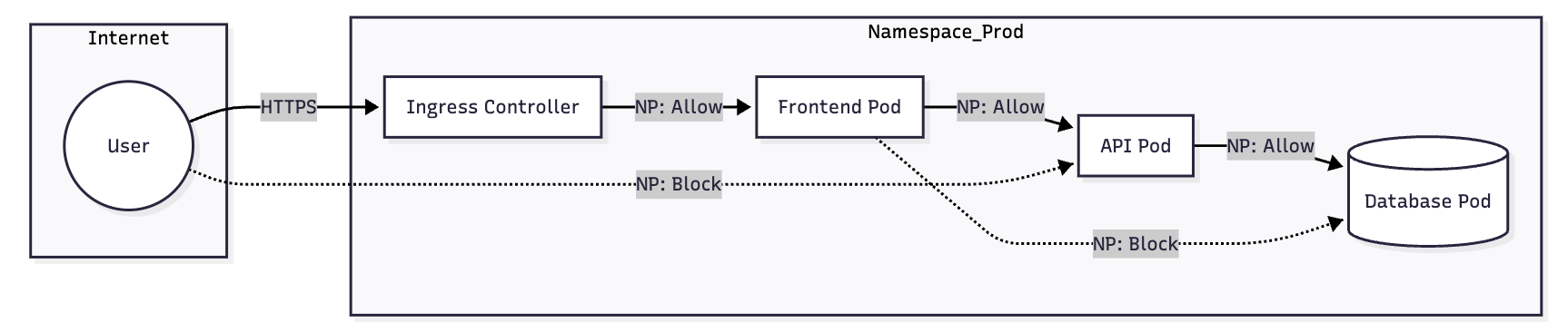
This example demonstrates a secure 3-tier architecture (Web -> API -> DB).
4.1 The Database Tier (Restricted Ingress)
Only allow the API pods to talk to the Database on port 5432.
apiVersion: networking.k8s.io/v1
kind: NetworkPolicy
metadata:
  name: db-policy
  namespace: app-stack
spec:
  podSelector:
    matchLabels:
      tier: database
  policyTypes: ["Ingress"]
  ingress:
  - from:
    - podSelector:
        matchLabels:
          tier: api # Only API can talk to DB
    ports:
    - protocol: TCP
      port: 5432
4.2 The API Tier (Egress and DNS Hardening)
When you restrict Egress, you must allow DNS (Port 53), or the Pod cannot resolve service names like db-service.svc.cluster.local.
apiVersion: networking.k8s.io/v1
kind: NetworkPolicy
metadata:
  name: api-policy
  namespace: app-stack
spec:
  podSelector:
    matchLabels:
      tier: api
  policyTypes: ["Ingress", "Egress"]
  ingress:
  - from:
    - podSelector:
        matchLabels:
          tier: frontend
    ports:
    - protocol: TCP
      port: 8080
  egress:
  # 1. Allow traffic TO the Database
  - to:
    - podSelector:
        matchLabels:
          tier: database
    ports:
    - protocol: TCP
      port: 5432
  # 2. Allow traffic TO CoreDNS (Mandatory for Egress Policies)
  - to:
    - namespaceSelector:
        matchLabels:
          kubernetes.io/metadata.name: kube-system
      podSelector:
        matchLabels:
          k8s-app: kube-dns
    ports:
    - protocol: UDP
      port: 53
    - protocol: TCP
      port: 53
5. IPBLOCK AND EXTERNAL TRAFFIC
The ipBlock selector is used for traffic entering or leaving the cluster (e.g., talk to an external RDS instance or an on-prem legacy API).
egress:
- to:
  - ipBlock:
      cidr: 192.168.1.0/24
      except:
      - 192.168.1.10/32 # Block a specific "bad" IP in that range
- Warning:
ipBlockshould generally not be used for internal Pod-to-Pod traffic because Pod IPs are ephemeral. UsepodSelectorinstead.
6. VISUAL: TRAFFIC FLOW RECONCILIATION
7. TROUBLESHOOTING & NINJA AUDITING
7.1 "Policy is applied but not working?"
Verify your CNI supports policies:
# Check for Calico nodes
kubectl get pods -n kube-system -l k8s-app=calico-node

# Check for Cilium agents
kubectl get pods -n kube-system -l app.kubernetes.io/name=cilium-agent
7.2 Testing Connectivity (The "Swiss Army Knife" Pod)
Spawn a temporary pod to test port access:
# Run a netshoot pod and try to reach the DB
kubectl run -it --rm debug-pod --image=nicolaka/netshoot -- /bin/bash
# Inside the pod:
nc -zv db-service 5432
7.3 Auditing Namespaces
Find namespaces that are missing a Default Deny policy (The "Security Hole" check):
kubectl get ns -o json | jq -r '.items[].metadata.name' | while read ns; do
  if [[ $(kubectl get netpol -n $ns -o name | wc -l) -eq 0 ]]; then
    echo "WARNING: Namespace $ns has NO NetworkPolicies (Allow All)"
  fi
done
7.4 Cilium Specific Debugging
If using Cilium, you can watch packet drops in real-time:
# Get the Cilium pod name on the specific node
kubectl exec -it -n kube-system cilium-xxxxx -- cilium monitor --type drop