Pod Security: Contexts, Capabilities, and Standards
In the Kubernetes shared-responsibility model, the cluster provides the orchestration, but the Pod Security Context defines the boundary between the container and the host kernel. Hardening this boundary is the primary defense against Container Breakouts and lateral movement.
1. ARCHITECTURE: KERNEL-LEVEL ENFORCEMENT
When you define a securityContext, the API Server doesn't just store YAML; it instructs the Container Runtime (CRI) to invoke specific Linux Kernel features during the clone() and execve() system calls.
1.1 The Security Boundary Layers
- Namespaces: Isolate resources (PID, Net, Mount).
- Cgroups: Limit resources (CPU, Mem).
- Security Context: Configures user identity (UID/GID) and kernel-level permissions (Capabilities/Seccomp).
2. SECURITY CONTEXT: THE SPECIFICATION
Security contexts are defined at two levels. Container-level settings always override Pod-level settings.
2.1 Pod-Level (spec.securityContext)
Applies to all containers, including Init Containers.
fsGroup(Recursive Ownership): When a volume is mounted, Kubelet performs achmodandchownto this GID.- Architect Note: On large volumes with millions of files, this can cause "Timeout" errors during Pod startup. Use
fsGroupChangePolicy: OnRootMismatchto optimize.
- Architect Note: On large volumes with millions of files, this can cause "Timeout" errors during Pod startup. Use
runAsNonRoot: The Kubelet will validate the image manifest. If the image is built asUSER root, the Pod will be blocked from starting.
2.2 Container-Level (spec.containers[].securityContext)
Applies granular locks to the specific process.
allowPrivilegeEscalation: Controls theno_new_privskernel flag. If false, it preventssetuidbinaries (likesudo) from changing the user's effective UID.readOnlyRootFilesystem: Mounts the container's root as read-only. This is the #1 defense against zero-day exploits that attempt to download and execute malware (e.g.,/tmp/miner).
2.3 The Comparison Matrix
| Feature | Level | Linux Primitive | Production Default |
|---|---|---|---|
runAsUser | Pod/Cont | setuid | > 10000 |
runAsNonRoot | Pod/Cont | API Check | true |
privileged | Cont | Full Device Access | false |
allowPrivilegeEscalation | Cont | no_new_privs | false |
readOnlyRootFilesystem | Cont | mount -o ro | true |
capabilities | Cont | capabilities(7) | drop: [ALL] |
3. LINUX CAPABILITIES: GRANULAR ROOT
Root (UID 0) is traditionally "all or nothing." Linux Capabilities break this power into ~40 granular units. Kubernetes grants a default set (like NET_RAW and CHOWN).
3.1 The "Drop ALL" Strategy
A "Bible-grade" manifest always drops all default capabilities and adds back exactly what is needed.
NET_BIND_SERVICE: Needed to bind to ports < 1024.NET_RAW: Needed forping. (Danger: Enables ARP spoofing).
securityContext:
  capabilities:
    drop:
      - ALL
    add:
      - NET_BIND_SERVICE # Allow binding to port 80/443 as non-root
4. POD SECURITY STANDARDS (PSS)
Since the deprecation of PodSecurityPolicy (PSP), Kubernetes uses Pod Security Standards (PSS). This is a built-in Admission Controller that validates Pods against three predefined profiles.
4.1 The Three Profiles
- Privileged: Unrestricted. Used for system-level Pods (CNI, Storage Drivers).
- Baseline: Prevents known privilege escalations. Minimum standard for internal apps.
- Restricted: Heavily hardened. Follows current best practices for multi-tenant isolation.
4.2 Enforcement Logic
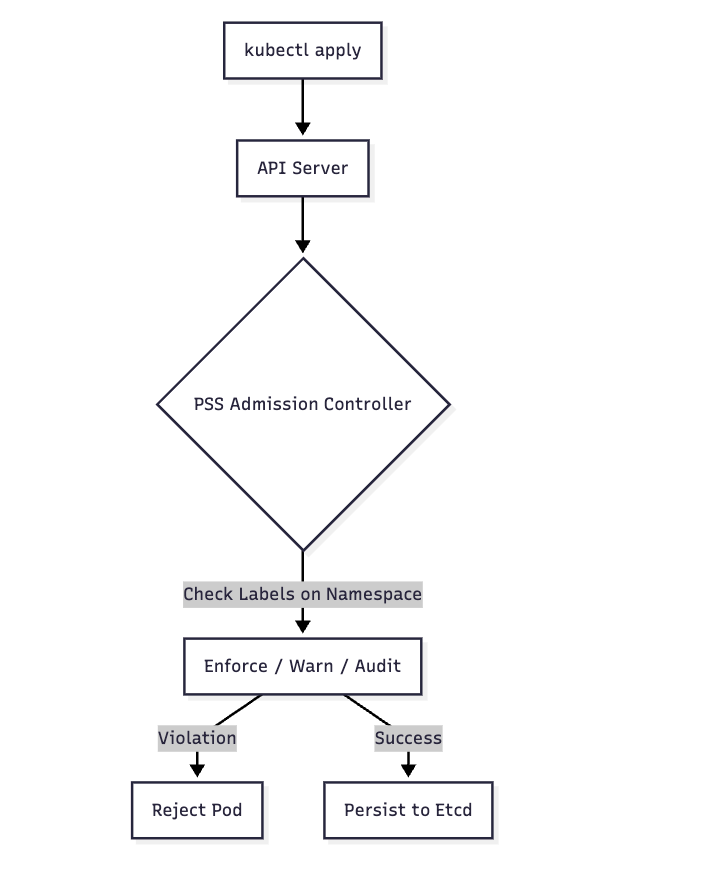
4.3 Namespace Configuration
PSS is configured via labels. You can set different levels for enforcement vs. warning.
apiVersion: v1
kind: Namespace
metadata:
  name: prod-restricted
  labels:
    # REJECT any pod that doesn't meet 'restricted'
    pod-security.kubernetes.io/enforce: restricted
    pod-security.kubernetes.io/enforce-version: latest
    # WARN the user if it doesn't meet 'restricted' (useful for migrations)
    pod-security.kubernetes.io/warn: restricted
5. BIBLE-GRADE MANIFEST: THE "GOLD STANDARD" POD
This manifest represents a production-hardened Pod that passes the Restricted PSS profile.
apiVersion: v1
kind: Pod
metadata:
  name: production-hardened-app
  labels:
    security: hardened
spec:
  # 1. Pod-level identity
  securityContext:
    runAsNonRoot: true
    runAsUser: 10001
    runAsGroup: 10001
    fsGroup: 10001
    seccompProfile:
      type: RuntimeDefault # Enforce the runtime's default syscall filter

  containers:
  - name: app
    image: my-app:v1.2.0
    securityContext:
      # 2. Immutable infrastructure
      readOnlyRootFilesystem: true
      allowPrivilegeEscalation: false
      runAsNonRoot: true

      # 3. Capability reduction
      capabilities:
        drop:
          - ALL
        # add: [ "NET_BIND_SERVICE" ] # Only if necessary

    # 4. Writable paths (since rootfs is RO)
    volumeMounts:
    - name: tmp-dir
      mountPath: /tmp
    - name: logs
      mountPath: /var/log/app

  volumes:
  - name: tmp-dir
    emptyDir: {}
  - name: logs
    emptyDir: {}
6. PRODUCTION DEBUGGING & PITFALLS
6.1 Inspecting Active Capabilities
How do you know what capabilities a process actually has?
- Exec into the Pod:
kubectl exec -it <pod> -- sh - Check Status:
cat /proc/1/status | grep Cap - Decode: Use
capsh --decode=<HexValue>on your local machine to see the list.
6.2 The nsenter Escape
If a container is privileged: true or has hostPID: true, an attacker can use nsenter to jump from the container namespace into the host namespace.
- Detection: Audit your cluster for any Pods with
hostPID,hostNetwork, orhostIPCset totrue.
6.3 Common Pitfall: fsGroup Latency
Problem: A Pod with a large 1TB volume takes 10 minutes to start.
Why: The Kubelet is recursively running chown on every file in the volume to match the fsGroup.
The Fix:
securityContext:
  fsGroup: 2000
  fsGroupChangePolicy: "OnRootMismatch" # Only chown if the root directory differs
6.4 Debugging with kubectl debug
To troubleshoot a failing "Restricted" Pod without compromising security:
# Spin up a debug container sharing the same process namespace
kubectl debug -it <pod-name> --image=busybox --target=app
7. SUMMARY: THE SECURITY CHECKLIST
- Drop ALL Capabilities: Add back only what is proven necessary.
- Read-Only Root: Forced immutability stops most payload drops.
- Non-Root UID: Ensure your application does not rely on
UID 0. - No Privilege Escalation: Block
setuidbinaries. - PSS Enforcement: Label namespaces with
enforce: restrictedto prevent accidental drift into insecure configurations.