Authentication: Encryption, TLS, and Secure Exchange
In Kubernetes, security is built on a foundation of cryptographic trust. Whether it is a developer running kubectl, a Kubelet joining a node, or a Service Mesh encrypting pod-to-pod traffic, the same core principles of encryption and identity apply.
1. ENCRYPTION FUNDAMENTALS
Encryption is the process of converting Plaintext into Ciphertext to ensure data remains confidential, integral, and authentic.
1.1 Symmetric Encryption (The Fast Path)
Uses a single shared secret key for both encryption and decryption.
- Characteristics: Extremely fast; minimal computational overhead.
- The "Key Exchange Problem": The challenge is safely sharing the key. If the key is intercepted during transit, the entire channel is compromised.
- K8s Use Case:
- Encryption at Rest: AES-CBC or AES-GCM are used to encrypt Secrets inside
etcd. - Session Data: Once a TLS handshake is finished, the remainder of the talk is symmetric.
- Encryption at Rest: AES-CBC or AES-GCM are used to encrypt Secrets inside
1.2 Asymmetric Encryption (The Identity Path)
Uses a mathematically linked Key Pair: a Public Key (distributed) and a Private Key (kept secret).
- Logic: Data encrypted with a Public Key can only be decrypted by its corresponding Private Key.
- Characteristics: Slower than symmetric; used primarily for identity verification and secure key exchange.
- K8s Use Case:
- SSH Access: Node management.
- Service Account Signing: API Server signs JWTs with a private key.
- TLS Certificates: API Server identity.
| Feature | Symmetric | Asymmetric |
|---|---|---|
| Key Type | Single Shared Key | Public/Private Pair |
| Primary Use | Bulk data (Storage/Streaming) | Identity & Key Exchange |
| Speed | High Performance | Computationally Heavy |
| Algorithm | AES-256, ChaCha20 | RSA, ECDSA, Ed25519 |
2. DEEP DIVE: SSH AUTHENTICATION MECHANICS
In Kubernetes administration (specifically kubeadm or bare-metal setups), SSH is the primary gatekeeper for Node access. It uses asymmetric encryption in two distinct phases.
Phase A: Server Authentication (Trust on First Use - TOFU)
- Initial Connection: When you first SSH into a node, the server sends its Host Public Key.
- The Fingerprint: Your client asks: "I don't recognize this key, do you trust it?"
- Persistence: Once accepted, the key is stored in
~/.ssh/known_hosts. This prevents Man-in-the-Middle (MITM) attacks; if the server's key changes later, the client will block the connection.
Phase B: Client Authentication (The Challenge-Response)
- Preparation: You place your
id_rsa.pub(Public Key) in the node's/home/user/.ssh/authorized_keys. - The Challenge: The server generates a random string, encrypts it with your Public Key, and sends it to your client.
- The Proof: Only your Private Key (stored locally) can decrypt that string. Your client sends the decrypted string back.
- Result: Identity is proven without a password ever crossing the network.
3. DEEP DIVE: TLS & HTTPS (The Hybrid Approach)
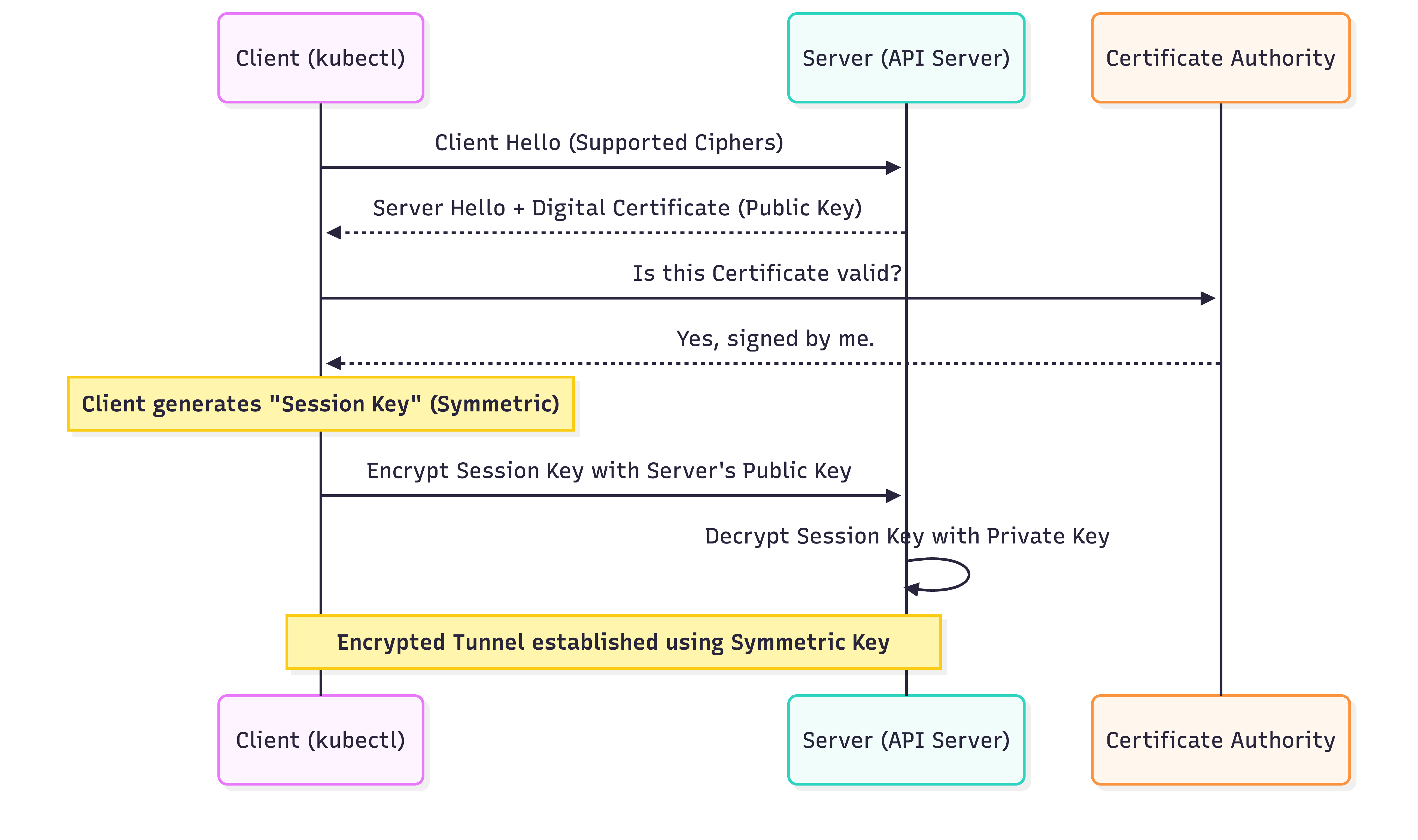
Standard TLS (HTTPS) is a Hybrid System. It uses Asymmetric encryption to solve the "Key Exchange Problem," then switches to Symmetric encryption for performance.
The TLS Handshake (Step-by-Step)
- Client Hello: Client sends supported cipher suites and a random number.
- Server Hello + Certificate: Server sends its Digital Certificate (which contains its Public Key and is signed by a CA).
- Validation: The Client checks its internal "Trust Store" (Root CAs) to verify the Server's certificate signature.
- Premaster Secret: The Client generates a new, random Symmetric Session Key, encrypts it with the Server’s Public Key, and sends it.
- Session Transition: The Server decrypts the session key using its Private Key.
- Symmetric Tunnel: Both sides now have a shared secret key. All further communication is encrypted using fast Symmetric (AES) encryption.
Mutual TLS (mTLS) in Kubernetes
In standard HTTPS, the client trusts the server. In Kubernetes internal networking (e.g., Kubelet $\leftrightarrow$ API Server), we use mTLS.
- Requirement: Both the Client and the Server must present a valid certificate.
- Benefit: Prevents unauthorized pods or rogue nodes from masquerading as system components.
4. PKI ROLES: CLIENTS VS. SERVERS
To troubleshoot "Permission Denied" or "Connection Refused" errors, you must map the identity flow:
| Initiator (Client) | Target (Server) | Authentication Method |
|---|---|---|
Developer (kubectl) | API Server | X.509 Cert or OIDC Token |
| Kubelet | API Server | Client Certificate (mTLS) |
| API Server | Kubelet | Client Certificate (mTLS) |
| API Server | Etcd | Client Certificate (mTLS) |
5. FILE FORMATS & NINJA TOOLING
Architects must distinguish between request files, keys, and signed certificates.
| Extension | Content Type | Role |
|---|---|---|
.key / .pem | Private Key | Keep Secret. Used to sign or decrypt. |
.pub | Public Key | Share Freely. Used to verify or encrypt. |
.csr | Cert Signing Request | The "Application" sent to a CA to get a cert. |
.crt / .cer | Signed Certificate | The "ID Card" containing the Public Key + Signature. |
Inspecting Kubernetes Certificates (OpenSSL)
If your cluster is failing due to expired certificates, use these commands to audit the /etc/kubernetes/pki directory:
# 1. Check if the API Server cert is actually valid
openssl x509 -in /etc/kubernetes/pki/apiserver.crt -text -noout | grep "Not After"

# 2. Verify that a Private Key matches a specific Certificate
# (The Modulus hashes must match exactly)
openssl x509 -noout -modulus -in apiserver.crt | openssl md5
openssl rsa -noout -modulus -in apiserver.key | openssl md5

# 3. View the Subject Alternative Names (SANs)
# (Ensures the cert is valid for the API Server's IP/DNS)
openssl x509 -in /etc/kubernetes/pki/apiserver.crt -text -noout | grep -A 1 "Subject Alternative Name"
6. ENCRYPTION AT-REST: ETCD SECRETS
By default, Kubernetes Secrets are stored as Base64 encoded strings in etcd. To truly secure them, you must configure the API Server to perform Symmetric Encryption before writing to disk.
Production EncryptionConfiguration
apiVersion: apiserver.config.k8s.io/v1
kind: EncryptionConfiguration
resources:
  - resources:
      - secrets
    providers:
      - aescbc: # AES-CBC is the standard symmetric provider
          keys:
            - name: key1
              secret: <32-byte-base64-encoded-secret>
      - identity: {} # Fallback (Plaintext) - required for migration
7. SUMMARY CHECKLIST FOR ARCHITECTS
- Symmetric is for Data: Used for disk encryption and the final state of a TLS tunnel.
- Asymmetric is for Identity: Used for the TLS Handshake and SSH logins.
- TLS Handshake is Hybrid: It uses Asymmetric keys to securely trade a Symmetric key.
- mTLS is Mandatory: Kubernetes internal component traffic should never be unencrypted or unauthenticated.
- Audit Your Certs: Use
opensslto check expiration dates annually.