Image Pull Secrets: Securing the Supply Chain
In a production-hardened cluster, public registries are rarely used. Organizations rely on private registries (ECR, ACR, Artifact Registry, or Artifactory) to ensure image provenance and security. Kubernetes manages access to these images via the imagePullSecrets mechanism.
1. ARCHITECTURAL FLOW: THE CREDENTIAL HANDOVER
Kubernetes does not pull images itself. The Kubelet manages the process but delegates the actual network I/O to the Container Runtime (CRI) such as containerd or CRI-O.
1.1 The Authentication Sequence (Visualized)
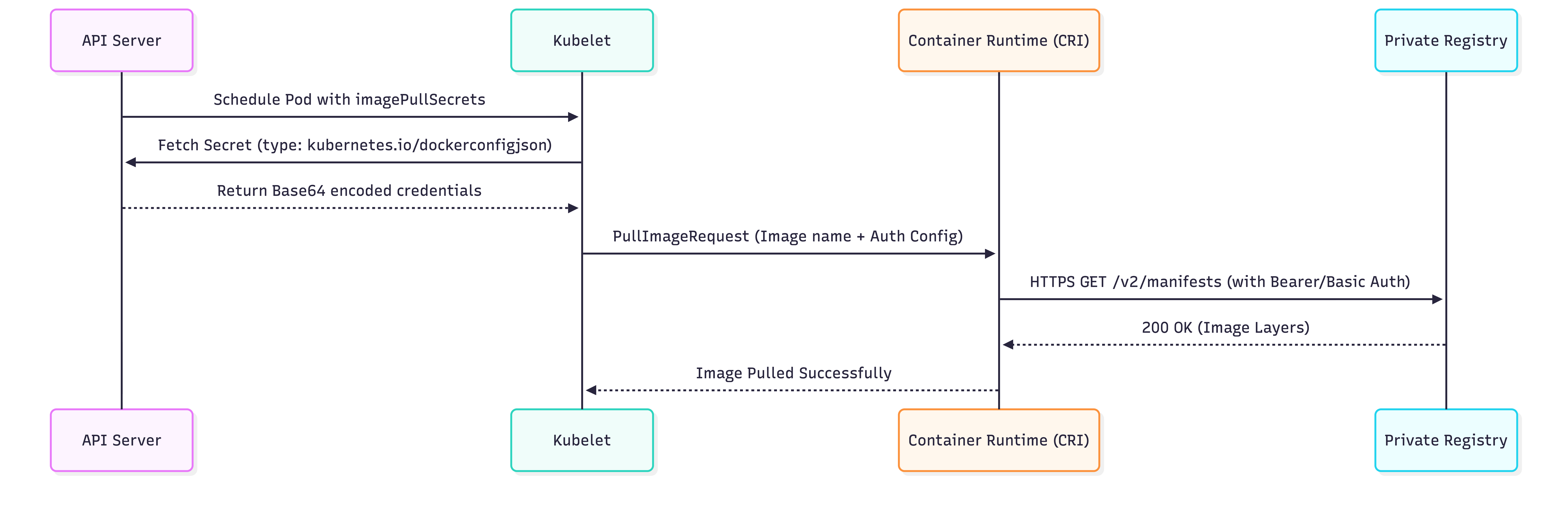
1.2 The Kubelet-CRI Interface
The Kubelet passes credentials to the CRI via a gRPC call. If the secret is missing or the credentials have expired, the CRI returns a 401 Unauthorized. The Kubelet then transitions the Pod status to ImagePullBackOff.
2. THE ANATOMY OF A REGISTRY SECRET
Registry secrets are not "Opaque" secrets. They must follow a strict JSON schema defined by the Docker client specification.
2.1 The .dockerconfigjson Schema
Inside the Kubernetes Secret, the data key must be named .dockerconfigjson.
Decoded Content Example:
{
  "auths": {
    "https://index.docker.io/v1/": {
      "auth": "dXNlcm5hbWU6cGFzc3dvcmQ="  // Base64 of 'username:password'
    },
    "123456789.dkr.ecr.us-east-1.amazonaws.com": {
      "auth": "QVdTOmF3c190b2tlbg=="
    }
  }
}
3. PRODUCTION CONFIGURATION PATTERNS
3.1 Pattern A: Workload-Specific (Pod Level)
Used for granular security where only specific Pods have access to specific repositories.
apiVersion: v1
kind: Pod
metadata:
  name: secured-app
spec:
  containers:
  - name: main
    image: my-private-registry.io/org/app:v1.2.0
  imagePullSecrets:
  - name: registry-credentials # Must exist in the same namespace
3.2 Pattern B: The Global Namespace Standard (ServiceAccount Level)
This is the Architect's Choice for internal platform teams. By patching a ServiceAccount, all Pods using that SA automatically inherit the credentials.
Annotated ServiceAccount Manifest:
apiVersion: v1
kind: ServiceAccount
metadata:
  name: app-runner
  namespace: prod-apps
# Pods using this SA will automatically have these secrets injected
imagePullSecrets:
- name: global-registry-auth
Implementation Command:
# To apply to the default ServiceAccount in a namespace
kubectl patch serviceaccount default -p '{"imagePullSecrets": [{"name": "my-registry-secret"}]}'
4. BIBLE-GRADE YAML: GENERATING SECRETS
While kubectl can generate these, an architect must know the underlying object structure for GitOps/CI-CD pipelines.
apiVersion: v1
kind: Secret
metadata:
  name: enterprise-registry-key
  namespace: finance-dept
type: kubernetes.io/dockerconfigjson
data:
  # This is the Base64 of the entire .dockerconfigjson file
  .dockerconfigjson: eyJhdXRocyI6eyJteS1yZWdpc3RyeS5pbyI6eyJhdXRoIjoiWkhWemVyNWhiV1U2Y0dGemMzZHZjbVE9In19fQ==
5. REAL-WORLD PRODUCTION CHALLENGES
5.1 Cloud Registry Token Expiration (The ECR/GCR Problem)
The Problem: Amazon ECR and Google Artifact Registry use temporary tokens that expire (usually every 12 hours). A static Kubernetes Secret will become invalid, causing ImagePullBackOff during autoscaling events.
The Solutions:
- The CronJob Method: A CronJob that runs
aws ecr get-login-passwordevery 8 hours and updates the K8s Secret. - Kubelet Credential Providers (v1.26+): Configure the Kubelet to natively use the Cloud Provider's IAM role to fetch tokens on-the-fly. (Recommended for self-managed clusters).
- Managed Node Identities: On EKS/GKE/AKS, ensure the Node IAM Role has the
AmazonEC2ContainerRegistryReadOnly(or equivalent) permission. The Kubelet will use the node's identity to pull images without needingimagePullSecretsat all.
5.2 ImagePullBackOff Debugging Checklist
If a Pod is stuck, run:
kubectl describe pod <pod-name>
Analyze the "Events" section:
Failed to pull image ...: rpc error: code = Unknown desc = Error response from daemon: unauthorized: authentication required: Incorrect credentials.Failed to pull image ...: rpc error: code = Unknown desc = Error response from daemon: repository not found: Typo in registry URL or Namespace.Failed to pull image ...: Get https://...: net/http: TLS handshake timeout: Network/Firewall blocking Node -> Registry communication.
6. NINJA AUDITING COMMANDS
Audit all Registry Secrets in the cluster
kubectl get secrets -A --field-selector type=kubernetes.io/dockerconfigjson
Inspect the registries covered by a secret
kubectl get secret <secret-name> -o jsonpath='{.data.\.dockerconfigjson}' | base64 -d | jq '.auths | keys'
Check which Pods are missing imagePullSecrets for private images
kubectl get pods -o json | jq -r '.items[] | select(.spec.imagePullSecrets == null) | .metadata.name'
7. SUMMARY: ARCHITECT'S DECISION MATRIX
| Goal | Recommended Approach |
|---|---|
| Simple Dev/Test | kubectl create secret docker-registry + Pod-level imagePullSecrets. |
| Multi-Tenant Cluster | Namespace-scoped secrets patched into the default ServiceAccount. |
| High Security / Audit | Dedicated ServiceAccounts with restricted imagePullSecrets per workload. |
| Public Cloud (EKS/GKE) | IAM Roles for Nodes. Avoid imagePullSecrets entirely to eliminate credential rotation overhead. |