DNS: The Global Hierarchy and Kubernetes Service Discovery
In a distributed system, IP addresses are ephemeral. The Domain Name System (DNS) provides the translation layer that allows services to find one another. In Kubernetes, this is managed by CoreDNS, a flexible, plugin-based DNS server that integrates directly with the API Server.
1. THE GLOBAL DNS HIERARCHY
DNS is a hierarchical, distributed database. Understanding the global flow is essential for configuring external access and cross-cluster communication.
1.1 Anatomy of a Fully Qualified Domain Name (FQDN)
Example: docs.kubernetes.io.
- The Root (
.): The silent dot at the end. It represents the top of the hierarchy managed by the 13 logical root servers. - Top-Level Domain (TLD):
.io,.com,.net. Managed by Registries. - Second-Level Domain (SLD):
kubernetes.io. This is what organizations register. - Subdomain:
docs. A delegation within the organization's zone.
2. THE RECURSIVE RESOLUTION PIPELINE
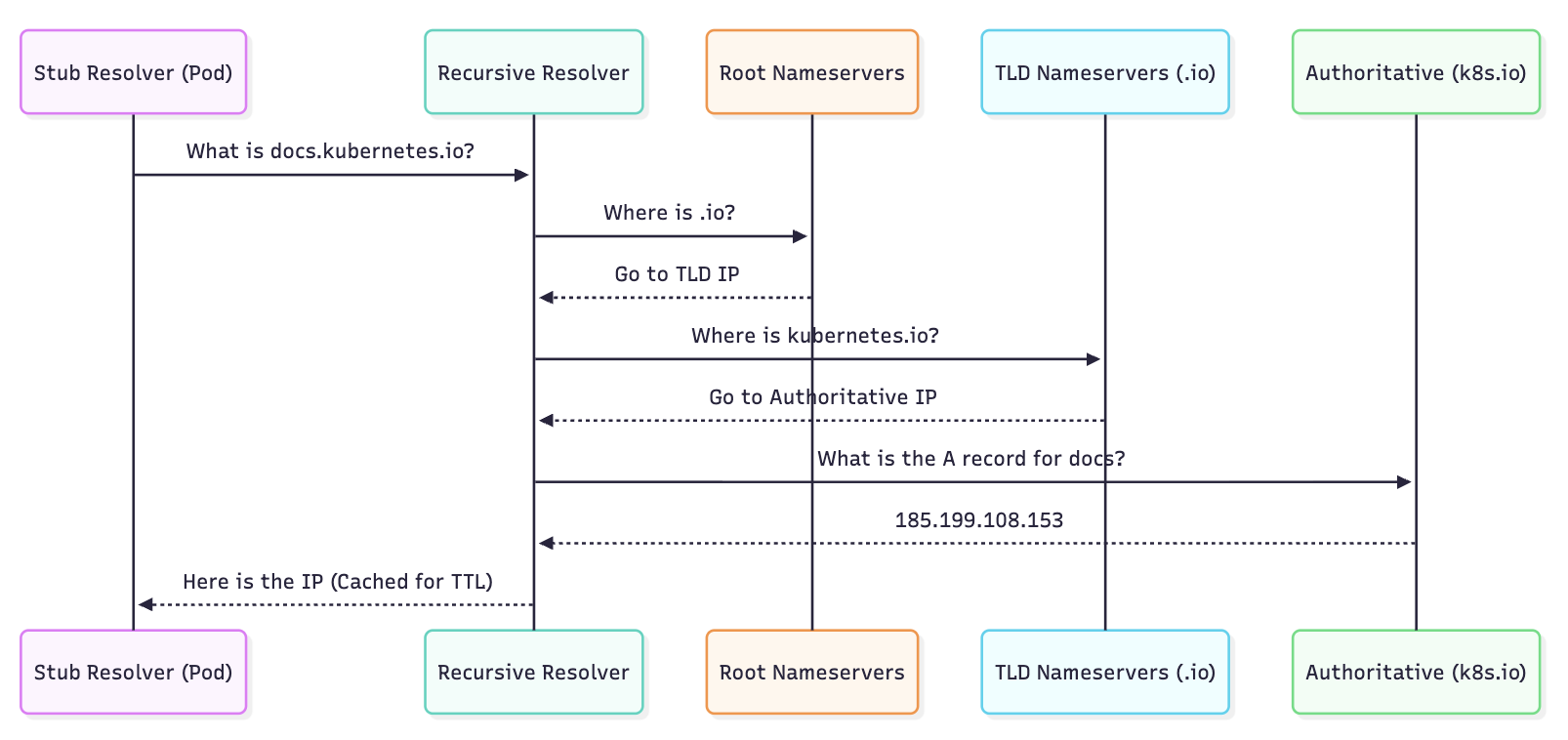
When a client (browser or Pod) requests a domain, the resolution follows a specific sequence of Iterative Queries.
2.1 The Components
- Stub Resolver: A library in the OS (e.g.,
glibc) that initiates the query. - Recursive Resolver: Usually your ISP or a public provider (8.8.8.8). It does the "heavy lifting" of traversing the hierarchy.
- Authoritative Nameserver: The final source of truth that holds the actual resource record (e.g., Route53, Cloudflare).
2.2 The Resolution Flow (Visualized)
3. KUBERNETES INTERNAL DNS (CoreDNS)
Inside a cluster, DNS is used for Service Discovery. Every Service and Pod gets a DNS record.
3.1 CoreDNS Architecture
CoreDNS is a single binary that uses a Chain of Plugins. When a query arrives, it passes through the chain until a plugin handles it.
kubernetesplugin: The most important. It watches the API Server for Service and Endpoint changes and generates DNS records in memory.cacheplugin: Reduces load on the API server.forwardplugin: Forwards queries for external domains (e.g.,google.com) to the node's upstream resolver.
3.2 Standard Internal Records
| Target | DNS Record Format | IP Type |
|---|---|---|
| Service (ClusterIP) | svc-name.namespace.svc.cluster.local | Service VIP |
| Headless Service | svc-name.namespace.svc.cluster.local | Multiple Pod IPs |
| Pod | pod-ip-dashed.namespace.pod.cluster.local | Pod IP |
4. THE ndots:5 PERFORMANCE PITFALL
One of the most critical architectural details in Kubernetes is the /etc/resolv.conf configuration inside a Pod.
4.1 The Mechanism
By default, Kubernetes sets options ndots:5.
- The Rule: If a domain name has fewer than 5 dots, the resolver will try all Search Domains before trying the name as an absolute FQDN.
4.2 The Resolution Search Order
If a Pod in the default namespace tries to resolve google.com (1 dot):
google.com.default.svc.cluster.local(Fail)google.com.svc.cluster.local(Fail)google.com.cluster.local(Fail)google.com.(Success via Upstream)
Impact: Every external request creates 3 unnecessary queries to CoreDNS, increasing latency and CoreDNS CPU usage.
The Bible Fix: Always use a trailing dot for external domains in your code/configs (e.g., google.com.). This tells the resolver the name is already absolute and skips the search list.
5. BIBLE-GRADE MANIFESTS
5.1 Customizing CoreDNS (The Corefile)
If you need to resolve on-premise domains via a VPN, modify the CoreDNS ConfigMap.
apiVersion: v1
kind: ConfigMap
metadata:
  name: coredns
  namespace: kube-system
data:
  Corefile: |
    .:53 {
        errors
        health {
           lameduck 5s
        }
        ready
        kubernetes cluster.local in-addr.arpa ip6.arpa {
           pods insecure
           fallthrough in-addr.arpa ip6.arpa
           ttl 30
        }
        prometheus :9153
        forward . /etc/resolv.conf # Upstream fallback
        cache 30
        loop
        reload
        loadbalance
    }
    # CUSTOM FORWARDING for corporate domain
    corp.internal:53 {
        forward . 10.0.0.53
    }
5.2 Pod DNS Policy Override
You can tune a Pod's DNS settings to bypass global cluster defaults.
apiVersion: v1
kind: Pod
metadata:
  name: dns-optimized-app
spec:
  containers:
  - name: app
    image: my-app:latest
  dnsPolicy: "None" # Ignore cluster defaults
  dnsConfig:
    nameservers:
      - 1.1.1.1
    searches:
      - prod.svc.cluster.local
    options:
      - name: ndots
        value: "1" # Optimized for external calls
6. DNS RECORDS DEEP DIVE
| Record Type | Purpose in K8s | Example |
|---|---|---|
| A | Standard service-to-IP mapping. | my-svc.ns.svc.cluster.local -> 10.96.0.10 |
| SRV | Discovering ports for a service. | _http._tcp.my-svc.ns.svc.cluster.local |
| PTR | Reverse DNS (IP to Name). | 10.96.0.10.in-addr.arpa -> my-svc.ns.svc.cluster.local |
| CNAME | Alias for external services. | Used by type: ExternalName services. |
7. TROUBLESHOOTING & NINJA TOOLING
7.1 The "Resolver Test"
Verify if the Pod is picking up search domains correctly:
kubectl exec -it <pod-name> -- cat /etc/resolv.conf
7.2 CoreDNS Latency Check
Look for "NXDOMAIN" spikes in CoreDNS metrics (via Prometheus):
sum(rate(coredns_dns_responses_total{code="NXDOMAIN"}[5m]))
7.3 Direct Querying
Test CoreDNS directly from within the cluster:
# Run a temporary debug pod
kubectl run -it --rm --restart=Never dnsutils --image=gcr.io/kubernetes-e2e-test-images/dnsutils:1.3

# Test internal resolution
nslookup kubernetes.default

# Test external resolution with timing
dig google.com
7.4 CoreDNS Logs
If DNS resolution is failing intermittently, enable the log plugin in the Corefile and watch the logs:
kubectl logs -n kube-system -l k8s-app=kube-dns -f