DNS: Global Hierarchy and Service Discovery Internals
In Kubernetes, IP addresses are ephemeral "cattle." The Domain Name System (DNS) is the essential abstraction layer that provides a stable identity for services. Kubernetes relies on CoreDNS, a flexible, plugin-based DNS server that dynamically translates service names into IP addresses by watching the API Server.
1. THE GLOBAL DNS HIERARCHY
DNS is a hierarchical, distributed database. Understanding the global structure is required for configuring Ingress, ExternalName services, and cross-cluster federation.
1.1 Anatomy of a Fully Qualified Domain Name (FQDN)
Example: api.prod.svc.cluster.local.
- The Root (
.): The silent terminal dot. It represents the top of the tree managed by the 13 logical root server clusters. - Top-Level Domain (TLD):
.local(internal) or.com/.io(external). - Second-Level Domain:
cluster. This is the cluster domain (default:cluster.local). - Subdomain/Service:
api.prod.svc. Identifies the service and namespace.
2. THE RESOLUTION PIPELINE: CLIENT TO AUTHORITATIVE
When a process initiates a DNS query, it traverses a chain of resolvers.
2.1 The Components
- Stub Resolver: The OS-level library (e.g.,
glibc) that sends the UDP/53 packet. - Recursive Resolver: (e.g., CoreDNS, Google 8.8.8.8, ISP). It performs the iterative walk of the DNS tree.
- Authoritative Nameserver: The final holder of the specific record (A, CNAME, TXT).
2.2 The Global Flow (Visualized)
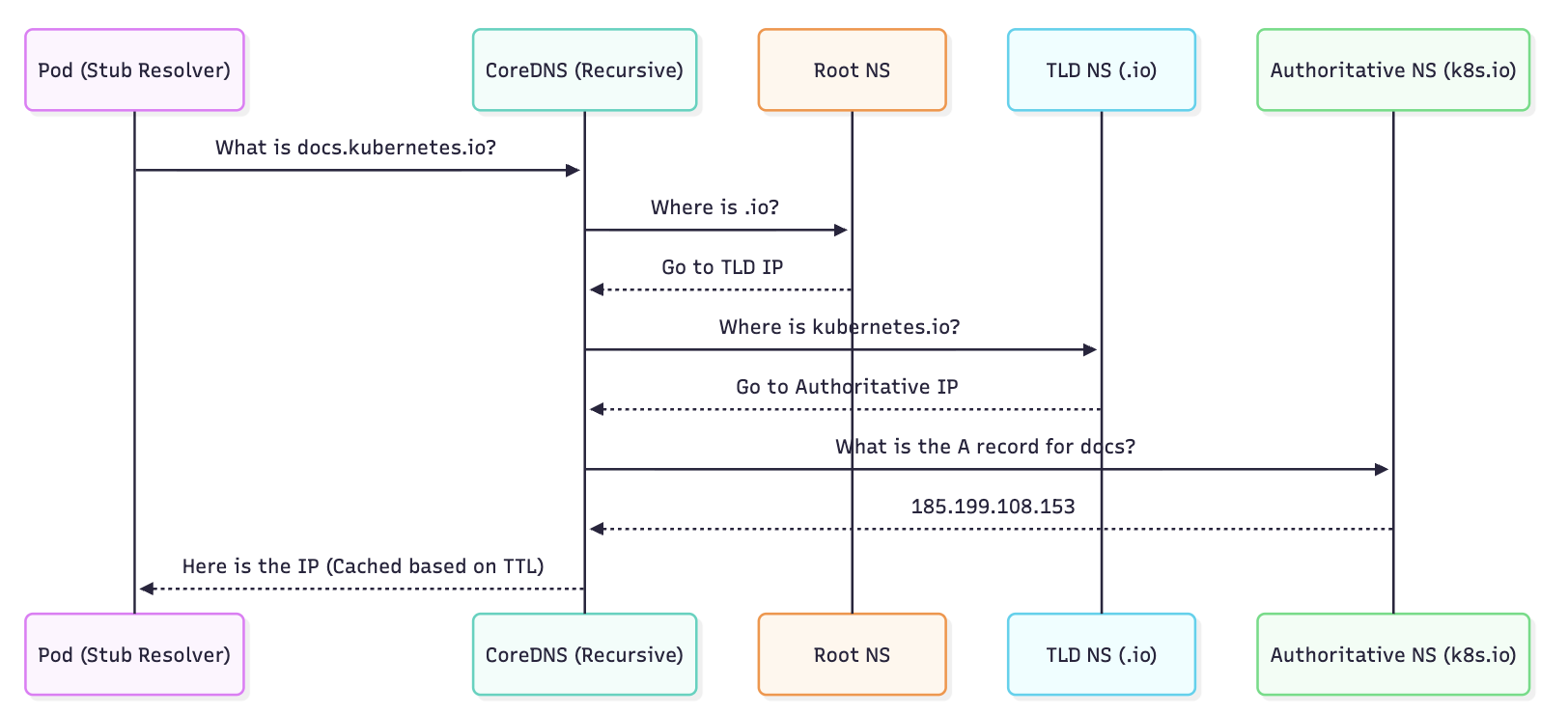
3. KUBERNETES DNS ARCHITECTURE (CoreDNS)
CoreDNS is a single binary that handles DNS queries via a Chain of Responsibility pattern using plugins.
3.1 The "Chain of Plugins" Logic
When a query enters CoreDNS, it passes through the plugins defined in the Corefile.
kubernetesplugin: Watches the API Server for Service/Endpoint changes. If the query matches an internal service, it responds immediately.cacheplugin: Intercepts the request. If the result is in RAM, it returns it to reduce CPU usage.forwardplugin: If thekubernetesplugin has "No Opinion" (e.g., query forgoogle.com), this plugin forwards the query to the node's/etc/resolv.conf(upstream).
3.2 Service Discovery Record Formats
| Target | DNS Record Format | IP Resolved |
|---|---|---|
| Service (ClusterIP) | my-svc.my-ns.svc.cluster.local | Service VIP |
| Headless Service | my-svc.my-ns.svc.cluster.local | Set of all Ready Pod IPs |
| StatefulSet Pod | pod-0.my-svc.my-ns.svc.cluster.local | Specific Pod IP |
| Named Port | _port-name._protocol.my-svc.my-ns.svc | SRV Record (IP + Port) |
4. PERFORMANCE PITFALL: THE ndots:5 DILEMMA
A default Kubernetes installation can suffer from significant DNS latency due to how Pods handle resolution.
4.1 The Mechanism
Inside every Pod's /etc/resolv.conf, K8s sets options ndots:5.
- Logic: If a domain has fewer than 5 dots, the resolver treats it as a "relative" name and tries all Search Domains first.
4.2 The Resolution Amplification
If a Pod in the billing namespace tries to resolve google.com (1 dot):
- Query:
google.com.billing.svc.cluster.local-> NXDOMAIN (Fail) - Query:
google.com.svc.cluster.local-> NXDOMAIN (Fail) - Query:
google.com.cluster.local-> NXDOMAIN (Fail) - Query:
google.com.-> SUCCESS (via Upstream)
Architectural Impact: Every external request generates 3 redundant queries, doubling or tripling CoreDNS load and adding ~10-50ms of latency per connection.
The Bible Fix: Use a Trailing Dot in your application code for external endpoints (e.g., api.stripe.com.). This forces the resolver to skip the search domains.
5. BIBLE-GRADE MANIFESTS
5.1 Customizing CoreDNS (The Corefile)
The Corefile is stored in a ConfigMap. This example shows production hardening, including corporate DNS forwarding and performance logging.
apiVersion: v1
kind: ConfigMap
metadata:
  name: coredns
  namespace: kube-system
data:
  Corefile: |
    .:53 {
        errors
        health {
           lameduck 5s
        }
        ready
        # KUBERNETES PLUGIN: High performance mode
        kubernetes cluster.local in-addr.arpa ip6.arpa {
           pods insecure
           fallthrough in-addr.arpa ip6.arpa
           ttl 30
        }
        prometheus :9153
        forward . /etc/resolv.conf
        cache 30
        loop
        reload
        loadbalance
        log . {
            class denial # Only log NXDOMAIN to save space
        }
    }
    # FORWARDING: Resolve corporate internal tools via VPN
    corp.internal:53 {
        forward . 10.50.0.10 10.50.0.11
        cache 60
    }
5.2 NodeLocal DNSCache (Production Standard)
In large clusters, CoreDNS becomes a bottleneck. NodeLocal DNSCache runs a small DNS caching agent as a DaemonSet on every node.
- Benefit: Pods talk to their local node over a virtual IP (
169.254.20.10). - Result: Avoids
iptablesDNAT andconntrackoverhead, significantly reducing DNS timeouts.
6. DNS RECORDS DEEP DIVE: SRV & PTR
While A records are standard, Senior Engineers use SRV and PTR for specialized discovery.
6.1 SRV (Service) Records
Used to find the port number and hostname of a service. Critical for gRPC or legacy systems that don't use port 80.
dig SRV _http._tcp.my-service.default.svc.cluster.local
6.2 PTR (Pointer) Records
Used for Reverse DNS (IP to Name). Essential for security logging and troubleshooting.
dig -x 10.96.0.10 -> returns my-service.default.svc.cluster.local.
7. TROUBLESHOOTING & NINJA TOOLING
7.1 Auditing the Search Path
If your app cannot find a service, verify the ndots and search list inside the Pod:
kubectl exec -it <pod-name> -- cat /etc/resolv.conf
7.2 Real-time Query Testing
Never use ping to test DNS; use dig or nslookup.
# Start a debug pod with nettools
kubectl run -it --rm --restart=Never dns-debug --image=tutum/dnsutils

# Test short name (within same namespace)
nslookup my-service

# Test FQDN (across namespaces)
dig my-service.other-namespace.svc.cluster.local
7.3 CoreDNS Health & Logs
If DNS is failing cluster-wide, check for CoreDNS "CrashLoopBackOff" (often caused by the loop plugin detecting a circular reference in /etc/resolv.conf).
kubectl logs -n kube-system -l k8s-app=kube-dns -f
7.4 Latency Monitoring
Check CoreDNS metrics for latency spikes:
# Prometheus Query for DNS Latency
histogram_quantile(0.99, sum(rate(coredns_dns_request_duration_seconds_bucket[5m])) by (le))