PKI Architecture: Private CAs and mTLS
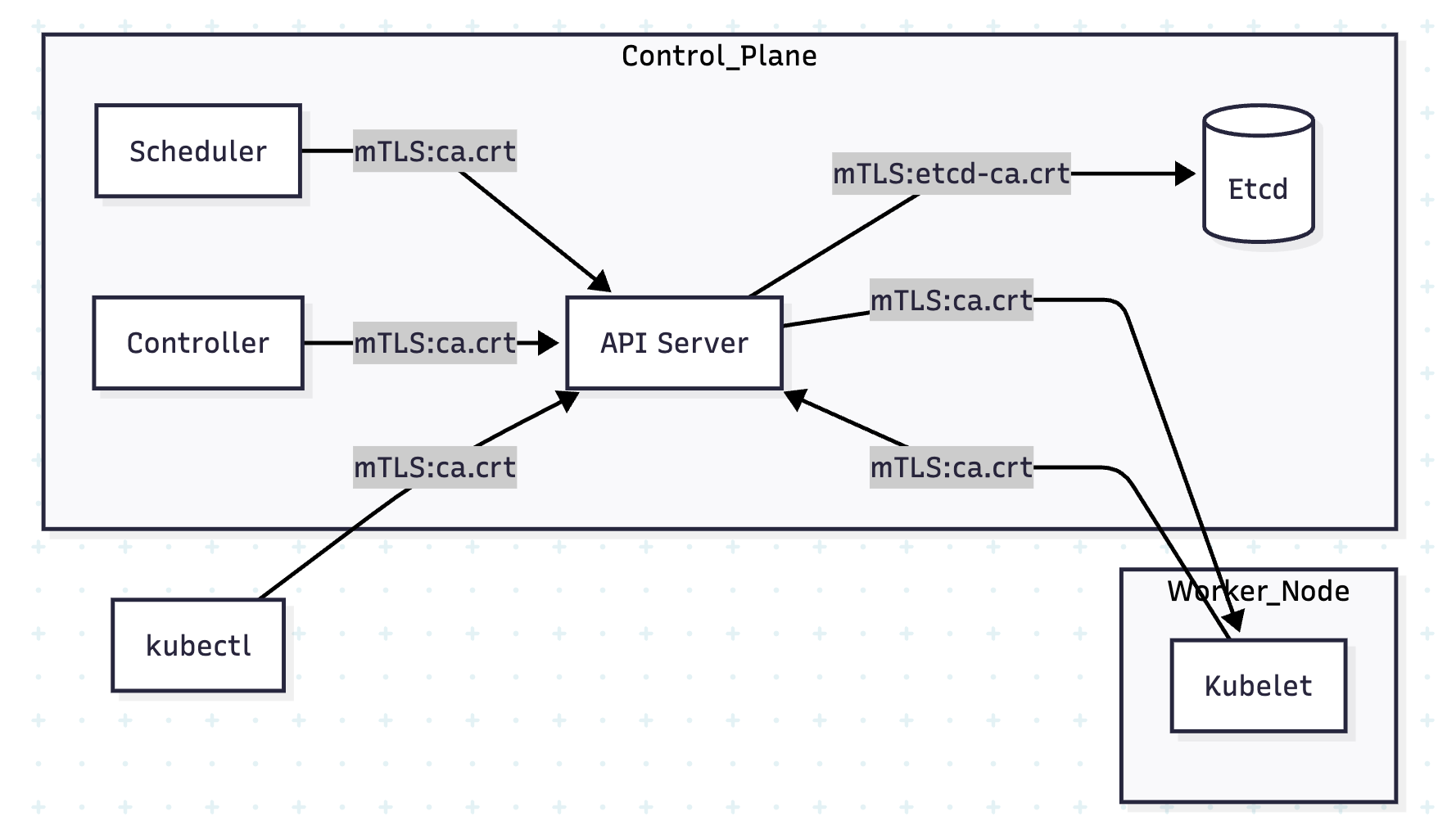
Kubernetes security is entirely dependent on a Public Key Infrastructure (PKI). Almost every connection within the cluster—whether it is the Scheduler talking to the API Server or the API Server talking to Etcd—is secured by Mutual TLS (mTLS) using certificates signed by a Private Root Certificate Authority (CA).
1. THE ARCHITECTURE OF TRUST: PRIVATE CAs
In a production cluster, you do not use public CAs (like DigiCert or Let's Encrypt) for internal component communication. Instead, Kubernetes uses a Private CA.
1.1 Why a Private CA?
- Trust Boundary: You only want the cluster to trust certificates it issued. Public certificates would allow any entity with a valid public cert to potentially spoof a component.
- Zero Cost & High Velocity: Clusters generate hundreds of short-lived certificates for nodes, users, and service accounts. A private CA allows for instant, automated signing.
- Blast Radius Isolation: Hardened clusters often use Separate CAs for different subsystems (e.g., a dedicated CA for Etcd).
1.2 The Certificate Hierarchy
Standard kubeadm clusters organize their PKI in /etc/kubernetes/pki:
| CA File | Responsibility |
|---|---|
ca.crt / ca.key | The Main Root CA. Signs API Server, Scheduler, and Controller Manager certs. |
etcd/ca.crt | The Etcd Root CA. Isolated trust for the data store. |
front-proxy-ca.crt | Used for the Aggregation Layer (e.g., Metrics Server) to authenticate to the API. |
2. COMPONENT ROLES: CLIENT VS. SERVER
In mTLS, the "Client" and "Server" roles are determined by the Connection Initiator.
| Initiator (Client) | Receiver (Server) | Authentication Strategy |
|---|---|---|
| kubectl | API Server | Client Cert (Admin) $\leftrightarrow$ Server Cert (API) |
| Scheduler | API Server | Client Cert (System) $\leftrightarrow$ Server Cert (API) |
| API Server | etcd | Client Cert (API-Etcd) $\leftrightarrow$ Server Cert (Etcd) |
| API Server | Kubelet | Client Cert (API-Kubelet) $\leftrightarrow$ Server Cert (Node) |
3. mTLS CASE STUDIES: THE HANDSHAKES
3.1 Case Study: Scheduler $\leftrightarrow$ API Server
The Scheduler must prove it is a system component, and the API Server must prove it is the legitimate cluster head.
1. The Server Proof (API Server):
The API Server presents its certificate located at /etc/kubernetes/pki/apiserver.crt.
- Subject:
CN=kube-apiserver - SANs: Must include the Cluster IP (10.96.0.1) and DNS (
kubernetes.default.svc).
2. The Client Proof (Scheduler):
The Scheduler presents its client certificate stored as Base64 inside /etc/kubernetes/scheduler.conf.
- Subject:
CN=system:kube-scheduler - Logic: The API Server checks the
CN. Because it starts withsystem:, it grants the Scheduler special internal permissions.
3.2 Case Study: API Server $\leftrightarrow$ etcd (Isolated Trust)
To protect the database, etcd usually requires certificates from a different CA than the rest of the cluster.
The etcd Static Pod Config (/etc/kubernetes/manifests/etcd.yaml):
spec:
  containers:
  - command:
    - etcd
    - --cert-file=/etc/kubernetes/pki/etcd/server.crt # Its Identity
    - --key-file=/etc/kubernetes/pki/etcd/server.key
    - --trusted-ca-file=/etc/kubernetes/pki/etcd/ca.crt # The only CA it trusts
    - --client-cert-auth=true # ENFORCE mTLS
The API Server Client Config (/etc/kubernetes/manifests/kube-apiserver.yaml):
spec:
  containers:
  - command:
    - kube-apiserver
    - --etcd-cafile=/etc/kubernetes/pki/etcd/ca.crt
    - --etcd-certfile=/etc/kubernetes/pki/apiserver-etcd-client.crt
    - --etcd-keyfile=/etc/kubernetes/pki/apiserver-etcd-client.key
3.3 Case Study: API Server $\leftrightarrow$ Kubelet (Node Bootstrapping)
Kubelet is a systemd service. It joins the cluster via a TLS Bootstrapping process.
- Bootstrap: Kubelet uses a temporary Bootstrap Token to contact the API.
- CSR: Kubelet generates a Certificate Signing Request (CSR) for its own identity (
CN=system:node:<name>). - Approval: The Controller Manager (or an admin) approves the CSR.
- Issue: The CA signs the cert and Kubelet saves it to
/var/lib/kubelet/pki/kubelet-client-current.pem.
4. PKI DIRECTORY STRUCTURE (BIBLE REFERENCE)
| Path | File Purpose |
|---|---|
/etc/kubernetes/pki/ca.crt | The Cluster Root CA. Everything trusts this. |
/etc/kubernetes/pki/apiserver.crt | API Server's Identity (Server Cert). |
/etc/kubernetes/pki/apiserver-kubelet-client.crt | API Server's identity when it calls Kubelet (logs/exec). |
/etc/kubernetes/pki/etcd/server.crt | Etcd's Identity (Server Cert). |
/etc/kubernetes/pki/apiserver-etcd-client.crt | API Server's identity when it calls Etcd. |
/var/lib/kubelet/pki/kubelet.crt | Node's Server Identity. |
5. NINJA COMMANDS: PKI AUDITING
5.1 Decoding the "Issuer" Chain
Verify that a certificate was signed by the correct CA. If the issuers don't match, mTLS will fail with unknown authority.
# Check the API Server Certificate
openssl x509 -in /etc/kubernetes/pki/apiserver.crt -text -noout | grep -E "Subject:|Issuer:"

# Expected Output:
# Issuer: CN=kubernetes
# Subject: CN=kube-apiserver
5.2 Checking Certificate Expiration (The #1 Cluster Killer)
Kubernetes certificates created by kubeadm expire after 1 year.
# Check all certificates at once
kubeadm certs check-expiration
5.3 Debugging the Kubelet CSR
If a node won't join, check if the CSR is stuck pending.
kubectl get csr
# If Pending:
kubectl certificate approve <csr-name>
6. VISUAL: THE mTLS WEB
7. PRODUCTION ARCHITECT NOTES
- Etcd Isolation: Always use a separate CA for Etcd if using
kubeadmin a high-security environment. - SANs Matter: If you front your API Server with a Load Balancer, you must add the Load Balancer's IP/DNS to the API Server's certificate SANs, or
kubectlwill reject the connection. - Kubelet Server Certs: By default, Kubelets often use self-signed certificates for their server-side (logs/exec). For strict security, enable
RotateKubeletServerCertificateso they use the Cluster CA instead. - The "Front-Proxy": The
front-proxy-cais only used if you are using an Extension API Server (like the Metrics Server). It allows the main API to tell the extension API: "I have already authenticated this user, you can trust them."