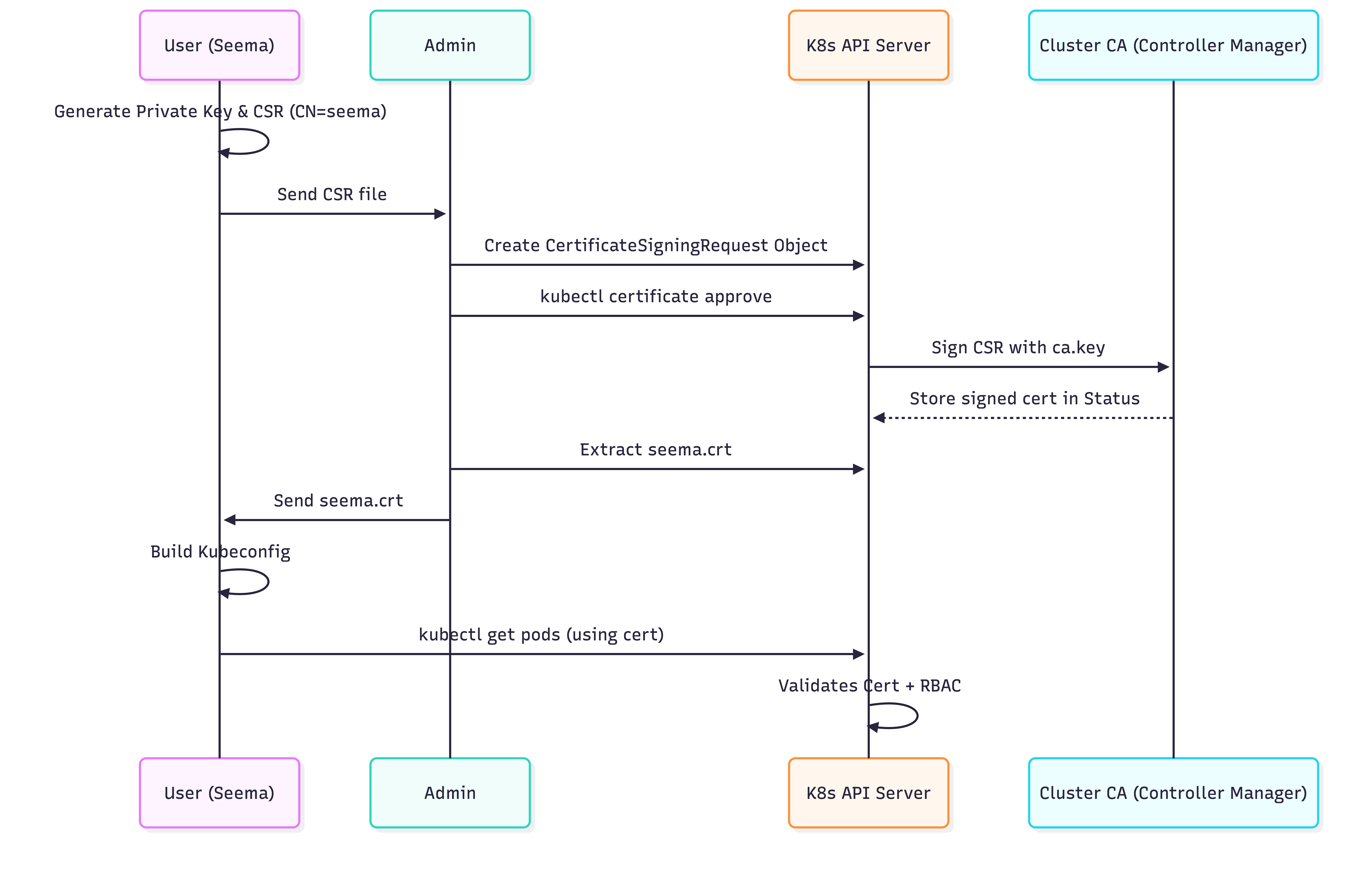
External Access: The CSR Lifecycle & X.509 Identity
Kubernetes does not have a "User" object in its database. Instead, it trusts any request signed by the Cluster Root CA. To grant a human or an external process access, we use the CertificateSigningRequest (CSR) API to bootstrap a trusted X.509 identity.
1. ARCHITECTURAL MAPPING: X.509 TO RBAC
When the API Server receives a certificate, it extracts the identity from the Subject fields. This is the "Glue" between cryptography and authorization:
- Common Name (CN): Mapped to the User Name.
- Organization (O): Mapped to Groups.
Example Subject: /CN=seema/O=app1-devs/O=platform-team
- Kubernetes identifies this caller as user
seema. - Kubernetes treats this user as a member of two groups:
app1-devsandplatform-team.
2. PHASE 1: CLIENT-SIDE IDENTITY GENERATION
The client initiates the process by creating a private key and a signing request. The private key never leaves the client's machine.
2.1 Generate Private Key and CSR
# 1. Create a 2048-bit RSA Private Key
openssl genrsa -out seema.key 2048

# 2. Create the CSR. Note the CN (Username) and O (Groups)
openssl req -new -key seema.key \
  -out seema.csr \
  -subj "/CN=seema/O=developers"
2.2 Verify the CSR Content
Before sending it to the admin, verify the attributes are correct:
openssl req -in seema.csr -noout -text | grep Subject
3. PHASE 2: THE KUBERNETES CSR API
The Administrator doesn't sign the certificate manually on the master node. Instead, they use the Kubernetes API to manage the lifecycle.
3.1 Create the CSR Object
The .csr file must be Base64 encoded and embedded into a Kubernetes object.
apiVersion: certificates.k8s.io/v1
kind: CertificateSigningRequest
metadata:
  name: user-seema-access
spec:
  request: <BASE64_ENCODED_CSR_HERE>
  # Standard signer for client certificates
  signerName: kubernetes.io/kube-apiserver-client
  expirationSeconds: 86400 # 24 hours (Production Best Practice: Short TTL)
  usages:
  - client auth
3.2 The Approval Workflow
- Submit:
kubectl apply -f csr.yaml - Audit: The admin inspects the request.
kubectl get csr user-seema-access - Approve: The Controller Manager signs the certificate using the Cluster CA.
kubectl certificate approve user-seema-access
3.3 Extract the Issued Certificate
Once approved, the signed certificate is stored in the status field of the CSR object.
kubectl get csr user-seema-access -o jsonpath='{.status.certificate}' | base64 -d > seema.crt
4. PHASE 3: KUBECONFIG PROVISIONING
The user now assembles their credentials into a portable kubeconfig.
# 1. Add User Credentials (Embedding ensures portability)
kubectl config set-credentials seema \
  --client-certificate=seema.crt \
  --client-key=seema.key \
  --embed-certs=true

# 2. Define Context
kubectl config set-context seema-access \
  --cluster=prod-cluster \
  --user=seema \
  --namespace=default

# 3. Test Connectivity (Will fail initially due to 403 Forbidden/RBAC)
kubectl get pods --context=seema-access
5. PHASE 4: AUTHORIZATION (RBAC)
A certificate only proves identity (Authentication). It does not grant permissions (Authorization). An admin must create a RoleBinding mapping the CN of the certificate to a Role.
apiVersion: rbac.authorization.k8s.io/v1
kind: RoleBinding
metadata:
  name: seema-dev-access
  namespace: default
subjects:
- kind: User
  name: seema # Matches the CN in the certificate
  apiGroup: rbac.authorization.k8s.io
roleRef:
  kind: ClusterRole
  name: edit # Standard built-in role
  apiGroup: rbac.authorization.k8s.io
6. PRODUCTION WARNING: THE REVOCATION PROBLEM
This is a critical architectural consideration for Principal Engineers:
Kubernetes X.509 certificates cannot be revoked.
- There is no native support for CRL (Certificate Revocation Lists) or OCSP (Online Certificate Status Protocol) in the
kube-apiserver. - If a user's private key is compromised, or a user leaves the organization, their certificate remains valid until it expires.
Mitigation Strategies:
- Short TTLs: Issue certificates with very short
expirationSeconds(e.g., 8-12 hours). - OIDC / Tokens: For human users, prefer OIDC (Okta, Google, AD) which allows for instantaneous session revocation.
- Use CSRs for Machines: Only use the CSR API for internal cluster components or trusted system-level automated processes.
7. TROUBLESHOOTING & NINJA AUDITING
7.1 "User is Authenticated but Unauthorized"
If the user gets a 403 Forbidden, they are authenticated (the cert is valid). Use the auth can-i tool to debug the RBAC mapping:
kubectl auth can-i list pods --as=seema
7.2 Inspecting Certificate Metadata
Verify the CN and O fields of an issued certificate:
openssl x509 -in seema.crt -text -noout | grep "Subject:"
7.3 Manual Approval Check
In high-security environments, you can audit who approved a specific CSR:
kubectl get csr user-seema-access -o jsonpath='{.status.conditions[0].reason}'
8. VISUAL: THE CSR FLOW