Ingress Host Routing: Subdomains and TLS Orchestration (In-Cluster Model)
In a multi-tenant production environment, organizations typically serve multiple applications (e.g., api.company.com, app.company.com) through a single ingress gateway. This requires Host-Based Routing and TLS Termination via SNI (Server Name Indication).
1. ARCHITECTURAL INTERNALS: SNI AND THE HOST HEADER
1.1 Server Name Indication (SNI)
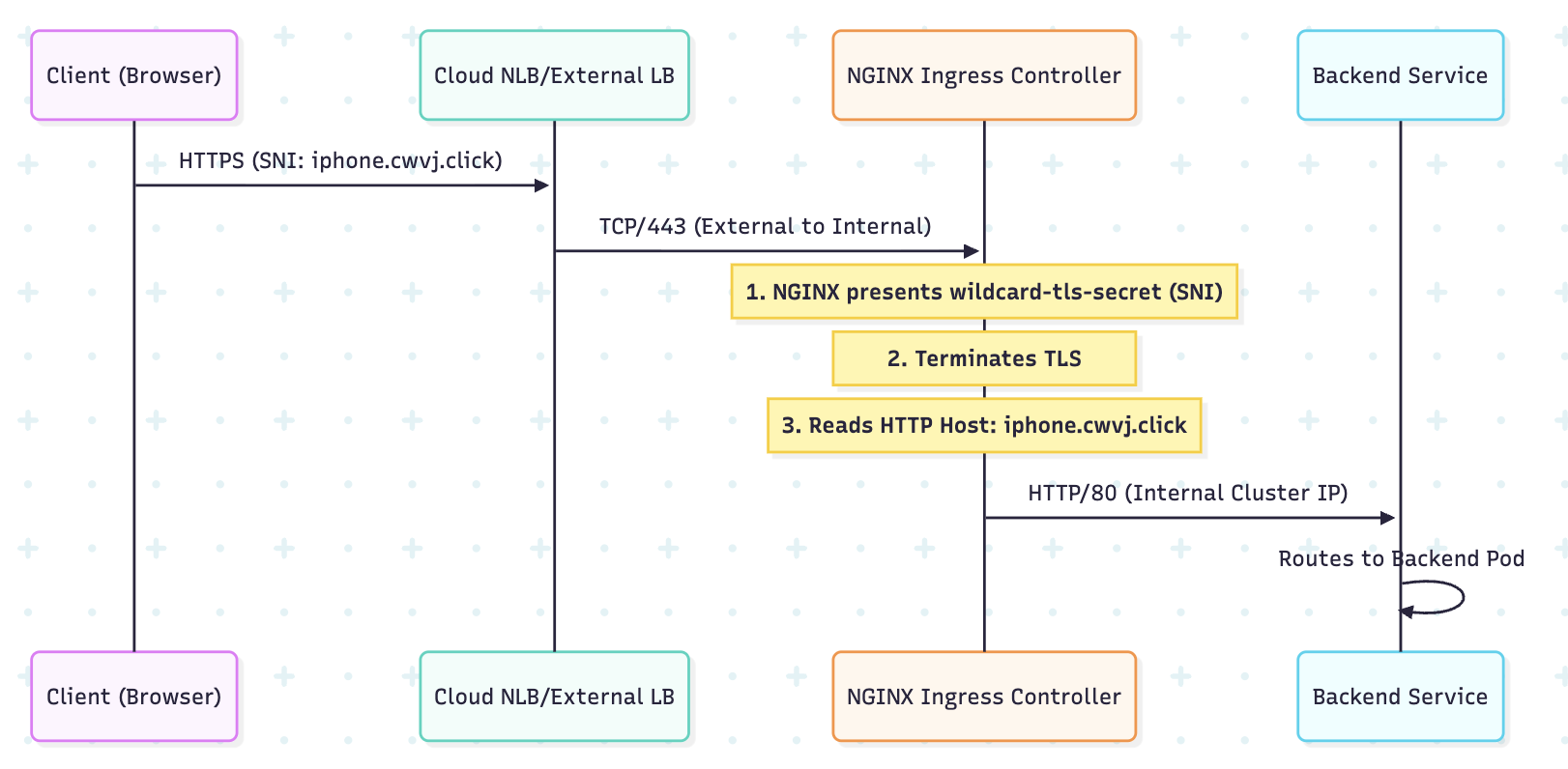
When a client connects over HTTPS, the SNI extension in the TLS handshake allows the client to tell the server which hostname it is trying to reach.
- The Benefit (NGINX IC): The NGINX Ingress Controller can host multiple TLS certificates (stored as Kubernetes Secrets) on a single port (443) and present the correct certificate based on the SNI hint.
1.2 Host-Header Multiplexing
After the TLS tunnel is established, the NGINX configuration inspects the HTTP Host header to determine which backend Service should receive the traffic. This is a highly efficient form of Layer 7 load balancing.
2. TLS IMPLEMENTATION: KUBERNETES SECRETS
In the in-cluster model (NGINX, HAProxy), certificates are stored as native Kubernetes objects.
2.1 The Certificate Secret
TLS certificates must be stored in a Secret of type kubernetes.io/tls.
apiVersion: v1
kind: Secret
metadata:
  name: wildcard-tls-secret
type: kubernetes.io/tls
data:
  # Base64 encoded private key
  tls.key: <BASE64_KEY>
  # Base64 encoded signed certificate
  tls.crt: <BASE64_CERT>
2.2 Security Warning: Certificate Revocation
If a Private Key is compromised, you must immediately:
- Revoke the certificate with the issuing CA.
- Delete the Kubernetes Secret.
- Force a reload of the Ingress Controller Pod to remove the cached certificate from NGINX memory.
3. BIBLE-GRADE MANIFEST: HOST-BASED ROUTING (NGINX IC)
This manifest demonstrates how to use a single Ingress resource to route traffic for multiple domains and enforce HTTPS.
apiVersion: networking.k8s.io/v1
kind: Ingress
metadata:
  name: nginx-host-router
  namespace: prod-apps
  annotations:
    # 1. Controller Identity
    kubernetes.io/ingress.class: nginx

    # 2. Automated SSL Redirection (HTTP -> HTTPS)
    nginx.ingress.kubernetes.io/ssl-redirect: "true"

    # 3. Increase Body Size (Example of NGINX tuning)
    nginx.ingress.kubernetes.io/proxy-body-size: "10m"

spec:
  ingressClassName: nginx

  # 4. Centralized TLS Configuration
  tls:
  - hosts:
    - iphone.cwvj.click
    - android.cwvj.click
    - cwvj.click
    secretName: wildcard-tls-secret # Refers to the Secret created above

  rules:
  # RULE 1: Subdomain for iPhone App
  - host: iphone.cwvj.click
    http:
      paths:
      - path: /
        pathType: Prefix
        backend:
          service:
            name: iphone-svc
            port:
              number: 80 # NGINX receives plain HTTP from its end

  # RULE 2: Subdomain for Android App
  - host: android.cwvj.click
    http:
      paths:
      - path: /
        pathType: Prefix
        backend:
          service:
            name: android-svc
            port:
              number: 80

  # RULE 3: Apex Domain (Default Web)
  - host: cwvj.click
    http:
      paths:
      - path: /
        pathType: Prefix
        backend:
          service:
            name: desktop-svc
            port:
              number: 80
4. THE EXTERNAL-DNS PATTERN (AUTOMATION)
The cluster must be integrated with your DNS provider (Route 53, Cloudflare, etc.).
Architectural Recommendation: Use the ExternalDNS operator.
- How it works: ExternalDNS watches the Ingress object's
rules.hostfield. When it sees a new hostname (e.g.,iphone.cwvj.click), it automatically creates the necessary A Record (or CNAME) in your external DNS provider pointing to the Ingress Controller's external IP address. - Result: Complete GitOps for routing configuration.
5. VISUAL: HOST-BASED ROUTING LOGIC (NGINX)
6. PRODUCTION TROUBLESHOOTING
6.1 Certificate Failure (NGINX IC)
If NGINX IC fails to load the certificate Secret:
- Symptom:
kubectl logs -f <nginx-ic-pod>will showError loading TLS certificateorNo such file or directory. - Fix: Ensure the Secret type is exactly
kubernetes.io/tls, and thattls.crtandtls.keykeys are present and correctly Base64 encoded.
6.2 NGINX Configuration Audit
If routing fails but the Pod is healthy, the generated NGINX config is wrong.
# Exec into the NGINX IC Pod and check the generated conf
kubectl exec -it <nginx-ic-pod> -n ingress-nginx -- cat /etc/nginx/nginx.conf
# Look for 'server_name' directives matching your hostnames and 'location' blocks matching your paths.
6.3 404/405 Errors with Redirection
If http:// doesn't redirect to https://:
- Check: The NGINX annotation
nginx.ingress.kubernetes.io/ssl-redirect: "true"must be set on the Ingress object.
6.4 Missing Pod Endpoints
If NGINX returns a 503, the backend Service has no available Endpoints.
- Check:
kubectl get endpoints <service-name>must show Pod IPs. If empty, check the Pod Readiness Probes.
7. ARCHITECT'S CHECKLIST FOR HOST ROUTING
- Wildcard Cert: Use
*.domain.comfor scalability. - ExternalDNS: Always integrate to automate DNS record management.
- HSTS: For security, ensure you set the HTTP Strict Transport Security header via an annotation:
nginx.ingress.kubernetes.io/hsts: "true". - Health Check: Ensure the readiness probe on the NGINX IC Pod reflects the health of the NGINX process itself, not just the Kubernetes Service.
---