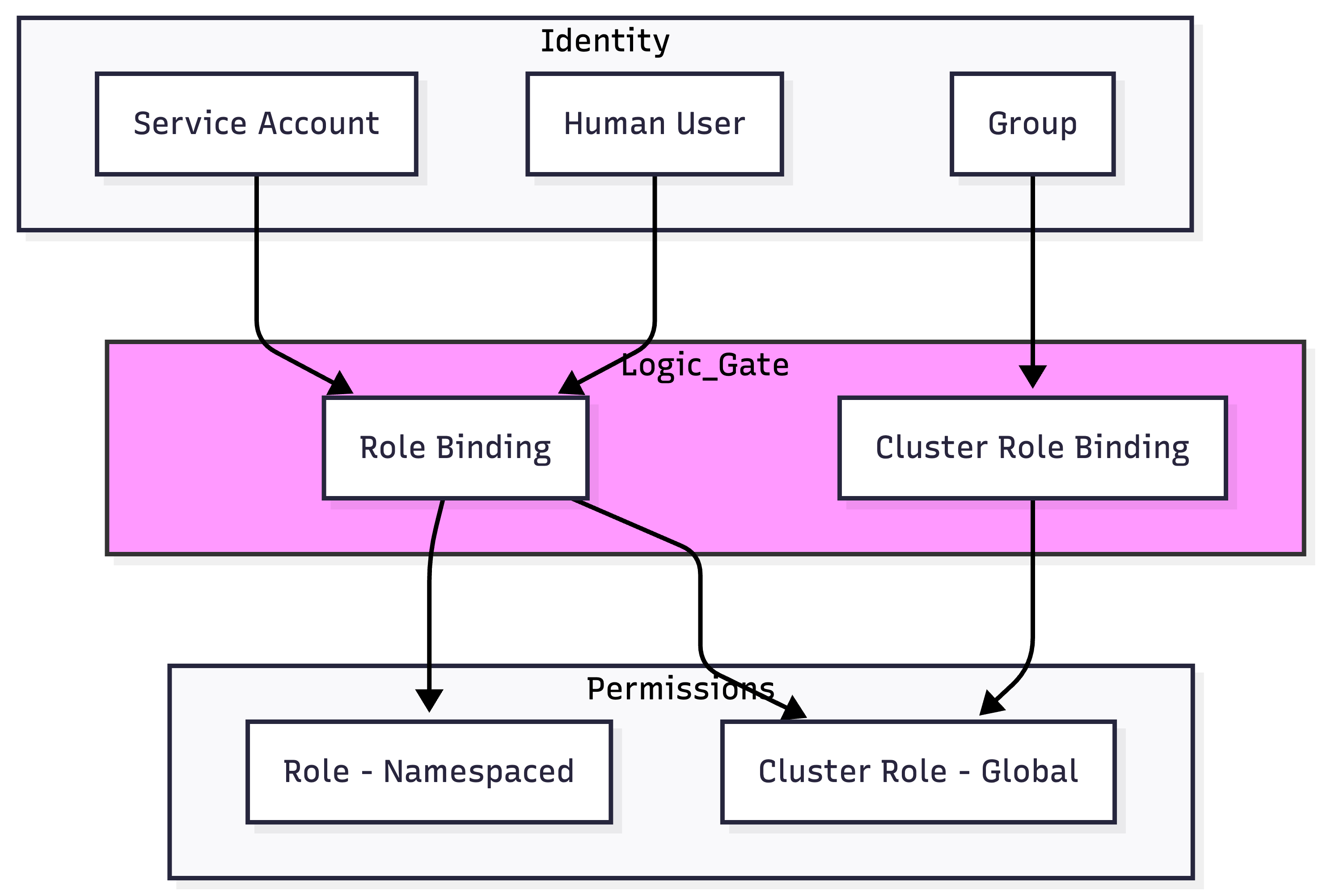
Identity & Authorization: Service Accounts and RBAC
In Kubernetes, every request to the API Server must be authenticated (Identity) and then authorized (Permissions). This document details the Service Account (the identity for non-human entities) and RBAC (the framework for governing what those identities can do).
1. IDENTITY: SERVICE ACCOUNTS (SAs)
Kubernetes distinguishes between Human Users (managed externally via OIDC/Certs) and ServiceAccounts (managed internally by the cluster).
1.1 Architectural Purpose
ServiceAccounts provide identities for processes running in Pods. This allows Pods to authenticate to the API Server to perform tasks like listing other Pods, updating ConfigMaps, or triggering Jobs.
1.2 The Token Evolution (K8s v1.24+ Internals)
A critical architectural shift occurred in v1.24 regarding how tokens are handled.
| Feature | Legacy (Pre-v1.24) | Modern (v1.24+) |
|---|---|---|
| Storage | Stored as a Secret in etcd indefinitely. | Not stored; generated on-demand by the API. |
| Lifecycle | Perpetual (Never expires). | Time-bound (Default 1 hour). |
| Mechanism | Simple JWT. | Projected Volume (Bound Service Account Token). |
| Security | High risk if the Secret is stolen. | Reduced risk via Audience (aud) and Expiry (exp). |
1.3 How a Pod Authenticates
When a Pod starts with a ServiceAccount, the Kubelet mounts three files into /var/run/secrets/kubernetes.io/serviceaccount/:
token: The signed JWT (JSON Web Token).ca.crt: The Root CA cert (used by the Pod to verify the API Server).namespace: A string indicating the Pod's namespace.
Visual Flow:
[ Pod ] --(Header: Authorization: Bearer <JWT>)--> [ API Server ] --(Validates via Public Key)--> [ Identity Confirmed ]
2. AUTHORIZATION: RBAC OBJECTS
RBAC uses four primary objects to manage permissions.
| Object | Scope | Definition |
|---|---|---|
| Role | Namespace | A set of permissions (Rules) within a specific namespace. |
| ClusterRole | Cluster | A set of permissions that can be cluster-wide or reusable across namespaces. |
| RoleBinding | Namespace | Grants the permissions of a Role/ClusterRole to a subject within a namespace. |
| ClusterRoleBinding | Cluster | Grants the permissions of a ClusterRole to a subject across the entire cluster. |
2.1 The RBAC Verbs (The "What")
Standard verbs: get, list, watch, create, update, patch, delete.
Advanced/Special Verbs:
use: Specifically for PodSecurityPolicy (Deprecated) or certain volume types.impersonate: Allows a user to act as another user/group (Security Auditing).bind/escalate: Critical security verbs. Prevents a user from creating a Role with more permissions than they currently have.
3. BIBLE-GRADE YAML: PRODUCTION EXAMPLES
3.1 Namespace-Scoped Permissions (Role + RoleBinding)
The Scenario: Allow the jenkins-sa to manage deployments only in the ci-cd namespace.
# 1. The Identity
apiVersion: v1
kind: ServiceAccount
metadata:
  name: jenkins-sa
  namespace: ci-cd
automountServiceAccountToken: true # Default is true
---
# 2. The Permissions
apiVersion: rbac.authorization.k8s.io/v1
kind: Role
metadata:
  name: deployment-manager
  namespace: ci-cd
rules:
- apiGroups: ["apps"] # The Named API Group
  resources: ["deployments", "replicasets"]
  verbs: ["get", "list", "watch", "create", "update", "patch", "delete"]
---
# 3. The Binding
apiVersion: rbac.authorization.k8s.io/v1
kind: RoleBinding
metadata:
  name: jenkins-deploy-binding
  namespace: ci-cd
subjects:
- kind: ServiceAccount
  name: jenkins-sa
  namespace: ci-cd
roleRef:
  kind: Role
  name: deployment-manager
  apiGroup: rbac.authorization.k8s.io
3.2 The Reusable Pattern (ClusterRole + RoleBinding)
Architectural Hack: You can define a ClusterRole (to avoid duplicating Roles in every namespace) but bind it with a RoleBinding.
- Result: The user only gets those permissions inside the namespace where the RoleBinding exists.
# Define once at cluster level
apiVersion: rbac.authorization.k8s.io/v1
kind: ClusterRole
metadata:
  name: read-only-all
rules:
- apiGroups: [""]
  resources: ["*"]
  verbs: ["get", "list", "watch"]
---
# Bind in 'marketing' namespace only
apiVersion: rbac.authorization.k8s.io/v1
kind: RoleBinding
metadata:
  name: mark-viewer
  namespace: marketing
subjects:
- kind: User
  name: "mark@company.com"
  apiGroup: rbac.authorization.k8s.io
roleRef:
  kind: ClusterRole
  name: read-only-all # Reusing the ClusterRole
  apiGroup: rbac.authorization.k8s.io
4. SECURITY & PRIVILEGE ESCALATION
4.1 The "Escalation" and "Bind" Verbs
Kubernetes prevents a user from granting permissions they don't have.
- To create/update a Role, you must either:
- Already possess all the permissions you are trying to grant.
- Be granted the
escalateverb on therbac.authorization.k8s.iogroup.
4.2 Pod ServiceAccount Token Automounting
By default, every Pod gets a token mounted. If your Pod doesn't need to talk to the API, this is a security risk (Lateral Movement). Production Hardening:
spec:
  automountServiceAccountToken: false # Disable identity injection
4.3 Default Service Accounts
Every namespace has a default ServiceAccount. Never grant permissions to the default SA. Always create a dedicated SA for your workload.
5. EXTERNAL AUTOMATION: TOKEN REQUEST API
For external tools (GitHub Actions, Terraform) to access the cluster, do not use legacy Secrets. Use the TokenRequest API to get a short-lived token.
Command Line:
# Generate a token valid for 8 hours for a specific audience
kubectl create token jenkins-sa --duration=8h --audience=https://github.com/actions
6. TROUBLESHOOTING & NINJA COMMANDS
6.1 Checking Permissions (The can-i tool)
# Can I do this?
kubectl auth can-i get secrets --namespace=prod

# Can my ServiceAccount do this? (Impersonation check)
kubectl auth can-i list pods \
  --as=system:serviceaccount:dev:my-app-sa \
  -n dev
6.2 Inspecting JWT Tokens
If a Pod is receiving 403 Forbidden, inspect the token it is using:
# Get the token from a running pod
TOKEN=$(kubectl exec <pod-name> -- cat /var/run/secrets/kubernetes.io/serviceaccount/token)

# Decode locally (requires 'jq')
echo $TOKEN | cut -d. -f2 | base64 -d | jq .
Look for the iss (Issuer) and aud (Audience) claims. If the API Server is configured with a specific audience, the token must match.
7. VISUAL: RBAC BINDING LIFECYCLE