Kubernetes Workflow: Life of a Packet & Pod
This detailed workflow describes the lifecycle of a request (e.g., creating a Pod/Deployment) from kubectl to the container running on a node.
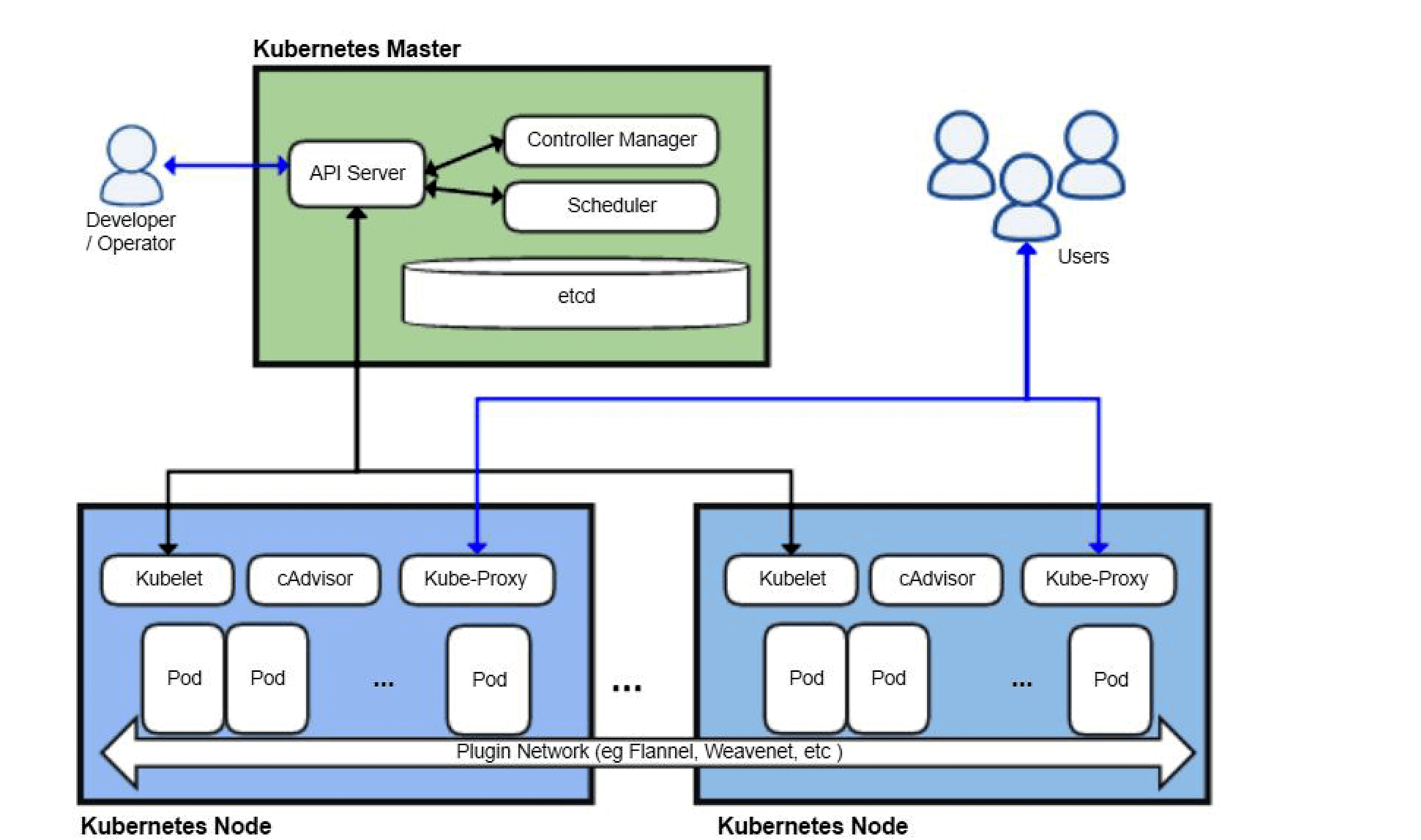
Phase 0: Client-Side (kubectl)
- YAML → JSON:
kubectlparses the YAML/JSON and sends the request to the API server. - Server URL: From kubeconfig (
current-context→ cluster →server). Default API server port is 6443 (HTTPS); load balancers may expose 443. - TLS: All client-to-API-server traffic is TLS; the client uses the certificate or token defined in kubeconfig for authentication.
Phase 1: Authentication & API Interception
User -> API Server
You run: kubectl apply -f my-deploy.yaml
- Client-Side Validation:
kubectlchecks the YAML schema locally (e.g. unknown fields may be stripped or warned). - Request: Sends
POST /apis/apps/v1/namespaces/default/deployments(for a Deployment). Examples:- Pod:
POST /api/v1/namespaces/default/pods - Service:
POST /api/v1/namespaces/default/services - Deployment:
POST /apis/apps/v1/namespaces/default/deployments
- Pod:
- Authentication (AuthN): API server validates the client (certificate, bearer token, or other configured method) and identifies the user/service account.
- Authorization (AuthZ): RBAC (or ABAC) checks whether that identity is allowed to perform the requested verb on the resource (e.g.
createondeploymentsindefault). - Mutating Admission Controllers:
ServiceAccount: Adds default service account if missing.SidecarInjection: Istio/Linkerd injects sidecar containers here.
- Schema Validation: API server validates the object against the resource schema (e.g.
replicasmust be an integer; invalid values are rejected). - Validating Admission Controllers:
LimitRanger: Applies or enforces default/min/max resource limits.ResourceQuota: Ensures the namespace has sufficient quota for the request.- OPA Gatekeeper / Kyverno: Custom policies (e.g. image registry allowlist, required labels).
Result: Object written to Etcd. API Server replies 201 Created.
Observe from the client:
kubectl get events -n default --sort-by='.lastTimestamp'
# or watch for new events while applying
kubectl get events -n default -w
Sample event after apply:
default   0s   Normal   Deployment    deployment/nginx-deploy   Created ReplicaSet nginx-deploy-7d4b8c9f5
default   0s   Normal   ReplicaSet    replicaset/nginx-deploy-7d4b8   Created pod: nginx-deploy-7d4b8-abc12
default   2s   Normal   Scheduled    pod/nginx-deploy-7d4b8-abc12   Successfully assigned default/nginx-deploy-7d4b8-abc12 to worker-1
default   5s   Normal   Pulled        pod/nginx-deploy-7d4b8-abc12   Container image already present on machine
default   5s   Normal   Created      pod/nginx-deploy-7d4b8-abc12   Created container nginx
default   5s   Normal   Started      pod/nginx-deploy-7d4b8-abc12   Started container nginx
Phase 2: The Control Loop (Controller Manager)
Etcd -> Controllers -> Etcd
- Deployment Controller:
- Watches
Deployments. Sees the new object. - Realizes there is no
ReplicaSetfor this Deployment. - Action: Creates a
ReplicaSetobject.
- Watches
- ReplicaSet Controller:
- Watches
ReplicaSets. Sees the new RS withreplicas: 3. - Realizes there are 0 Pods.
- Action: Creates 3
Podobjects in Etcd.
- Watches
Status: The Pods exist in Etcd but have spec.nodeName: "". They are in Pending state.
How controllers watch: Informers (client-go): Controllers use Informers, which do a one-time List and then a Watch on the API server. On reconnect, they re-List and then Watch again to avoid missing events. This pattern (list + watch, with optional resync) is the standard way all controllers observe state.
Phase 3: Scheduling (The Placement)
Scheduler -> API Server
- Notification: The Kube-Scheduler watches for Pods where
nodeNameis empty. - Scheduling Cycle:
- QueueSort: PriorityClass evaluation (Critical pods first).
- PreFilter/Filter: Removes nodes that don't fit.
- TaintToleration: Pod must tolerate node taints or the node is filtered out.
- NodeResourcesFit: Node must have sufficient allocatable CPU/memory for the Pod's requests.
- PreScore/Score: Ranks feasible nodes (e.g. ImageLocality, NodeResourcesBalancedAllocation).
- Binding: Scheduler submits a Binding (or PATCH) to set
spec.nodeNameon the Pod (e.g. tonode-server-3).
Status: The Pod object in Etcd is updated: spec.nodeName: Node-Server-3.
If scheduling fails (e.g. no node fits): Pod stays Pending. kubectl describe pod <name> shows in Events: e.g. "0/3 nodes are available: 3 node(s) didn't match Pod's node affinity" or "Insufficient cpu/memory". Fix by adding nodes, relaxing constraints, or checking taints/tolerations.
Phase 4: Execution (Kubelet & Runtime)
Kubelet -> CRI -> Container
- Watch: The Kubelet on Node-Server-3 sees the Pod assignment.
- Admission (Node Level): Kubelet checks if it truly has resources (avoiding race conditions).
- CRI (Container Runtime Interface): Kubelet calls
containerdvia gRPC.RunPodSandbox: Creates the "Pause" container (holds the Network Namespace).PullImage: Pulls the container image (if missing).CreateContainer: Creates the container spec.StartContainer: Starts the actual application process.
- CNI (Container Network Interface):
- When the "Pause" container starts, the Runtime calls the CNI Plugin (Calico/Flannel/Cilium).
- CNI allocates an IP (
10.244.1.5) and wires up thevethpair to the bridge.
Watch Pod progress (from client):
kubectl get pods -w
# or
kubectl get pod <name> -o jsonpath='{.status.phase}' ; echo
kubectl describe pod <name>   # Events show Pulling, Created, Started, and probe results
Phase 5: Service Discovery (Kube-Proxy)
Loop -> Network Rules
- Health Check: The process starts. Kubelet runs Startup and Readiness Probes.
- Ready: Once the probe passes, Kubelet updates Pod status to
Ready. - EndpointSlice Controller:
- Watches for Ready pods.
- Adds IP
10.244.1.5to the Service's Endpoint List.
- Kube-Proxy:
- Watches EndpointSlices.
- Updates Node Kernel rules (IPVS/IPTables) to forward traffic for the Service IP to
10.244.1.5.
Result: Traffic can now flow to the Pod. From another Pod: curl http://<svc-name>.<namespace>.svc.cluster.local or curl http://<svc-name> (same namespace).
Reverse Flow: Deleting a Pod / Scaling Down
- User/Controller: Deletes Pod (e.g. scale down or
kubectl delete pod). - API Server: Pod gets
deletionTimestamp; object remains until finalizers (if any) are cleared and grace period is honored. - EndpointSlice Controller: Removes the Pod IP from the Service's EndpointSlices once the Pod is not Ready (or is terminating, depending on
publishNotReadyAddresses). - Kube-Proxy: Updates rules so the Service IP no longer forwards to that Pod.
- Kubelet: Sends SIGTERM to the container; waits
terminationGracePeriodSeconds; then SIGKILL. Runs preStop hook if defined. - CRI/CNI: Container stops; CNI teardown removes the pod from the network. Kubelet deletes the Pod object from the API when the container has exited.
The sequence allows in-flight requests to complete (SIGTERM and grace period) before the Pod is removed from Service backends; the exact order of EndpointSlice update relative to SIGTERM is implementation-dependent.
Real-World Pitfalls
| Issue | Cause | What to check |
|---|---|---|
| Pod stuck Pending | No node fits (resources, taints, affinity) or scheduler not running | kubectl describe pod Events; kubectl get nodes; scheduler logs |
| ImagePullBackOff | Image name wrong, private registry auth, or network | kubectl describe pod → Events; imagePullSecrets; node can pull image |
| CrashLoopBackOff | Container exits; readiness/liveness fail | kubectl logs <pod> --previous; kubectl describe pod; app config / probes |
| Service has no Endpoints | No Pods match selector or Pods not Ready | kubectl get endpoints <svc>; kubectl get pods -l <selector>; readiness probes |